FreeQAs
 Request Exam  Contact
  • Home
  • View All Exams
  • New QA's
  • Upload
PRACTICE EXAMS:
  • Oracle
  • Fortinet
  • IBM
  • Juniper
  • Microsoft
  • Cisco
  • Citrix
  • CompTIA
  • VMware
  • ISC
  • SAP
  • EMC
  • PMI
  • HP
  • Salesforce
  • Other
  • Oracle
    Oracle
  • Fortinet
    Fortinet
  • IBM
    IBM
  • Juniper
    Juniper
  • Microsoft
    Microsoft
  • Cisco
    Cisco
  • Citrix
    Citrix
  • CompTIA
    CompTIA
  • VMware
    VMware
  • ISC
    ISC
  • SAP
    SAP
  • EMC
    EMC
  • PMI
    PMI
  • HP
    HP
  • Salesforce
    Salesforce
  1. Home
  2. UiPath Certification
  3. UiPath-ADAv1 Exam
  4. UiPath.UiPath-ADAv1.v2024-05-27.q139 Dumps
  • ««
  • «
  • …
  • 8
  • 9
  • 10
  • 11
  • 12
  • 13
  • 14
  • 15
  • 16
  • 17
  • …
  • »
  • »»
Download Now

Question 56

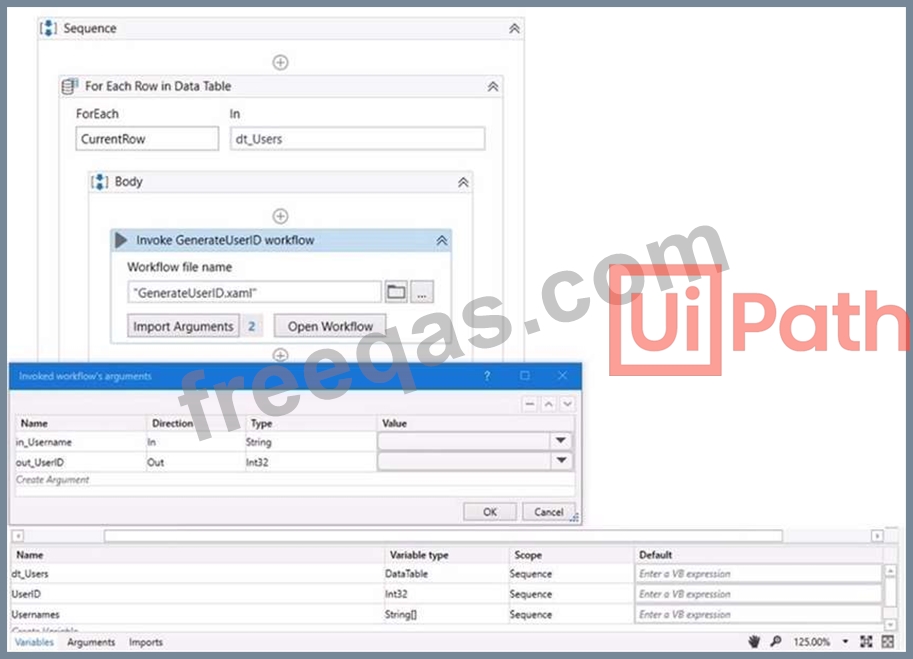
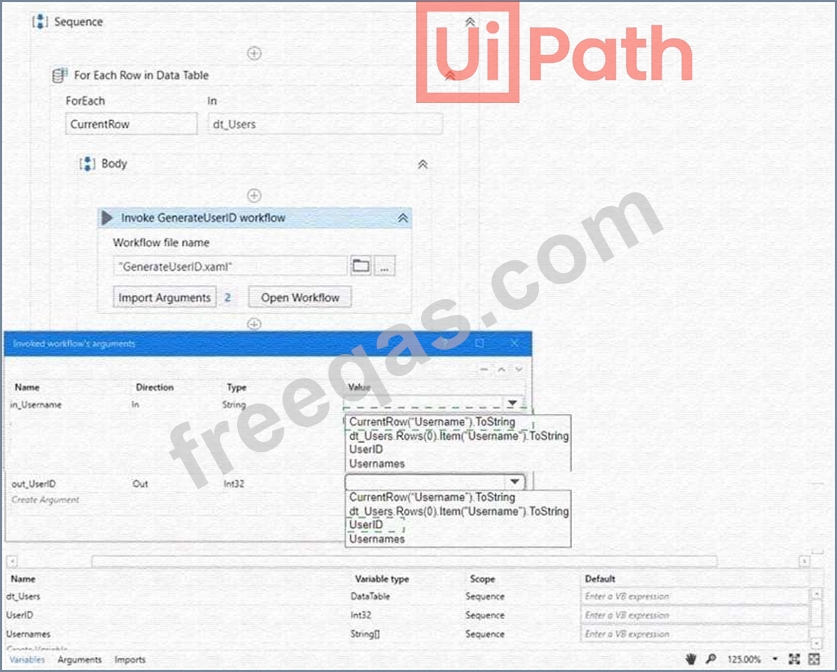
A developer wants to map the arguments that pass data to and from GenerateUserlD.xaml to the appropriate values in Main.xaml. The dt_Users datatable variable contains the columns First Name: Last Name Date of Birth and Username.
Instructions: From the Value drop-down lists shown in the following exhibit, select the correct variable that corresponds to each argument.
Correct Answer:

Explanation
The values to select from the drop-down lists for the in_Username and Out_UserID arguments are:
in_Username: CurrentRow("Username").ToString
Out_UserID: UserID
These values will ensure that the in_Username argument receives the value of the Username column from the current row of the dt_Users datatable, and the Out_UserID argument returns the value of the UserID variable that is generated by the GenerateUserID.xaml workflow.
insert code

Question 57

What is the difference between the UiPath Studio and UiPath StudioX development profiles?

Correct Answer: A
The main difference between UiPath Studio and UiPath StudioX is their target audience and functionality.
UiPath Studio is aimed at technical users and allows for complex automation development, including the ability to split automations into smaller workflows that can be invoked from within other workflows. On the other hand, StudioX is designed for non-technical business users to automate tasks without writing code, and while it does allow for simpler workflows, it does not have the same depth of functionality as Studio for modularizing workflows.
References:
UiPath Studio Guide: Introduction to StudioX
insert code

Question 58

A developer wants to create an automation in which the input from the user and pre-defined conditions determine the transition between stages. In UiPath Studio, which is the recommended type of workflow that meets the requirement?

Correct Answer: C
A flowchart is a type of workflow that allows developers to create complex and dynamic automation processes that can branch based on user input or predefined conditions. Flowcharts use graphical elements such as shapes, connectors, and annotations to represent the flow of logic and data between different stages or activities. Flowcharts are suitable for scenarios where the automation process is not linear or sequential, but rather depends on various factors and decisions. (UiPath Automation Developer study guide) References:
Flowchart
Types of Workflows
insert code

Question 59

A developer is using the REFramework template to automate a process. In "SetTransactionStatus" file, there is the following sequence of activities, where the last Log Message activity was added by the developer:
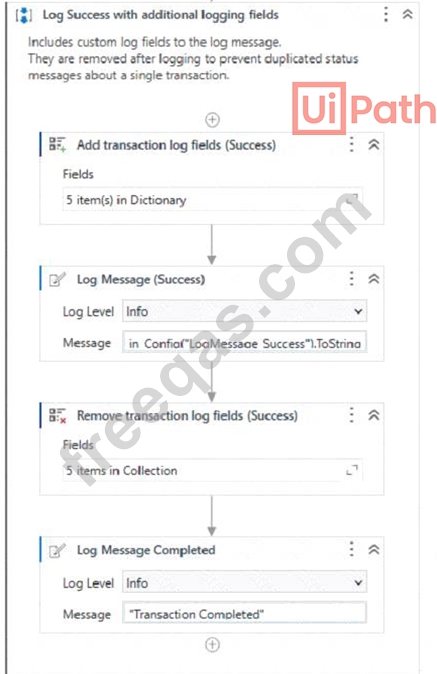
The configuration for Add Log Fields and Remove Log Fields activities are shown below:
Add transaction log fields (Success)
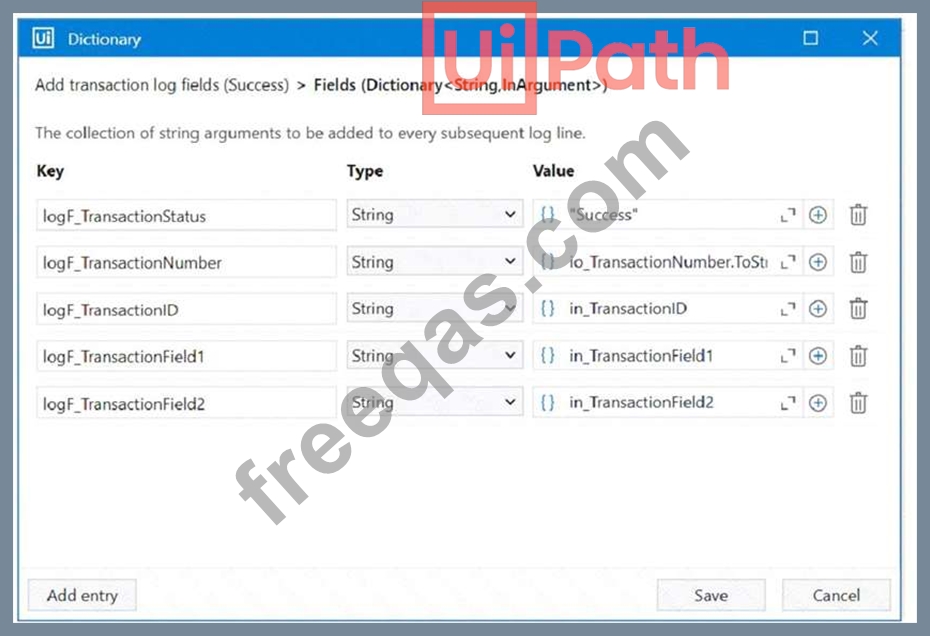

The developer runs the process and notices the argument values for the first transaction are:
in_TransactionlD = "07/18/2023 10:27:29"
io_TransactionNumber = 1
in_TransactionField1 = "UI235-80"
in_TransactionField2 = "Update Request"
Which of the following Log Message Details will be displayed when executing the activity Log Message Completed for the first transaction, considering it is successful?

Correct Answer: B
Explanation
The Log Message activity is used to write a diagnostic message at a specified level to the output panel, the log file, and Orchestrator1. The message can include custom log fields that are added by the Add Log Fields activity and removed by the Remove Log Fields activity2. In this case, the developer has added six log fields in the Add transaction log fields (Success) sequence and removed three of them in the Remove transaction log fields sequence. Therefore, the remaining three log fields (logF_TransactionField2, logF_TransactionID, and logF_TransactionStatus) will be displayed along with the default log fields (message, level, logType, timeStamp, fileName, processVersion, jobId, robotName, and machineId) when executing the Log Message Completed activity. The values of the log fields will be taken from the corresponding arguments of the Set Transaction Status activity.
References:
Add Log Fields activity documentation from UiPath
Remove Log Fields activity documentation from UiPath
Log Message activity documentation from UiPath
insert code

Question 60

A developer wants to run two processes on the same machine, the first process contains only HTTP Request activities and the second one performs UI Automation. What option needs to be enabled on the first process in order to ensure that the processes can run concurrently on the same machine?

Correct Answer: A
The Starts in Background option is a property of the process that indicates whether the process can run in parallel with other processes on the same machine. If this option is enabled, the process can run as a background process, meaning that it does not require user interaction or UI automation. This allows the process to run concurrently with another process that performs UI automation, such as the second process in the question. The Starts in Background option can be configured in the project settings of the process in UiPath Studio, or in the process settings in Orchestrator.
References:
Background Process - UiPath Studio
Background Process Automation - UiPath Robot
Managing Processes - UiPath Orchestrator
insert code
  • ««
  • «
  • …
  • 8
  • 9
  • 10
  • 11
  • 12
  • 13
  • 14
  • 15
  • 16
  • 17
  • …
  • »
  • »»
[×]

Download PDF File

Enter your email address to download UiPath.UiPath-ADAv1.v2024-05-27.q139 Dumps

Email:

FreeQAs

Our website provides the Largest and the most Latest vendors Certification Exam materials around the world.

Using dumps we provide to Pass the Exam, we has the Valid Dumps with passing guranteed just which you need.

  • DMCA
  • About
  • Contact Us
  • Privacy Policy
  • Terms & Conditions
©2026 FreeQAs

www.freeqas.com materials do not contain actual questions and answers from Cisco's certification exams.
