FreeQAs
 Request Exam  Contact
  • Home
  • View All Exams
  • New QA's
  • Upload
PRACTICE EXAMS:
  • Oracle
  • Fortinet
  • IBM
  • Juniper
  • Microsoft
  • Cisco
  • Citrix
  • CompTIA
  • VMware
  • ISC
  • SAP
  • EMC
  • PMI
  • HP
  • Salesforce
  • Other
  • Oracle
    Oracle
  • Fortinet
    Fortinet
  • IBM
    IBM
  • Juniper
    Juniper
  • Microsoft
    Microsoft
  • Cisco
    Cisco
  • Citrix
    Citrix
  • CompTIA
    CompTIA
  • VMware
    VMware
  • ISC
    ISC
  • SAP
    SAP
  • EMC
    EMC
  • PMI
    PMI
  • HP
    HP
  • Salesforce
    Salesforce
  1. Home
  2. UiPath Certification
  3. UiPath-ADAv1 Exam
  4. UiPath.UiPath-ADAv1.v2024-05-27.q139 Dumps
  • ««
  • «
  • …
  • 15
  • 16
  • 17
  • 18
  • 19
  • 20
  • 21
  • 22
  • 23
  • 24
  • …
  • »
  • »»
Download Now

Question 91

What is the purpose of the Capture All Elements feature in Object Repository?

Correct Answer: D
Explanation
The Capture All Elements feature is a tool that lives inside Capture Elements from Object Repository, and it extracts all the elements of an application from multiple screens simultaneously using the Computer Vision technology. It adds them to your Object Repository library, so that you can use them in your automation projects without having to manually add them one by one1. This feature is available in Studio and Studio Pro, but not in StudioX2.
References:
UiPath Community 2021.10 Stable Release - UIAutomation.
Capture Elements for Object Repository - UiPath Community Forum.
insert code

Question 92

Given the following list of arguments:

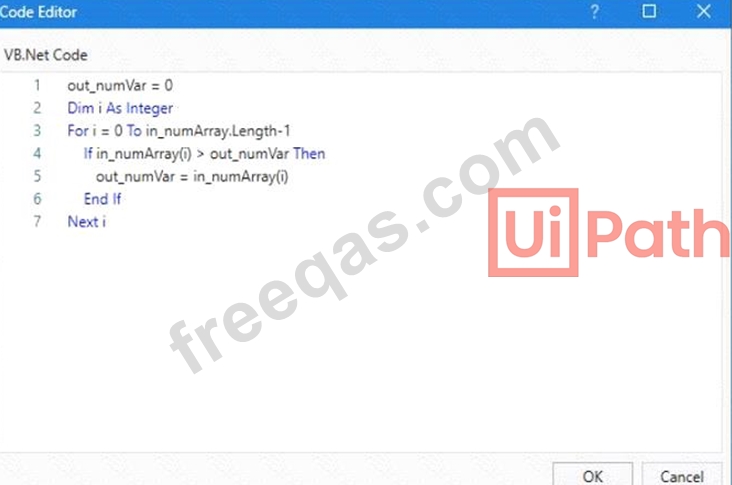
And the following code:

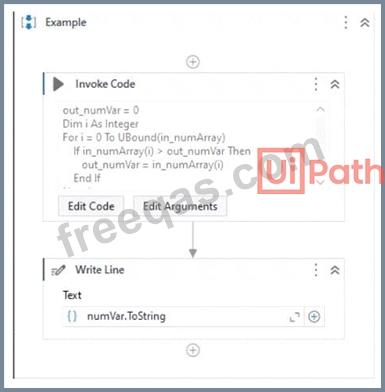
What is the value that will be displayed in the Output Panel at the end of the sequence below:

Correct Answer: D
The code in the Invoke Code activity is looping through an array of integers and checking if the current value is greater than the previous value. If it is, the current value is stored in the output variable. Since the last value in the array is 9, this will be the final value of the output variable. (UiPath Studio - Invoke Code - UiPath Academy) References:
Studio - Invoke Code - UiPath Documentation Portal
UiPath Studio - Invoke Code - UiPath Academy
insert code

Question 93

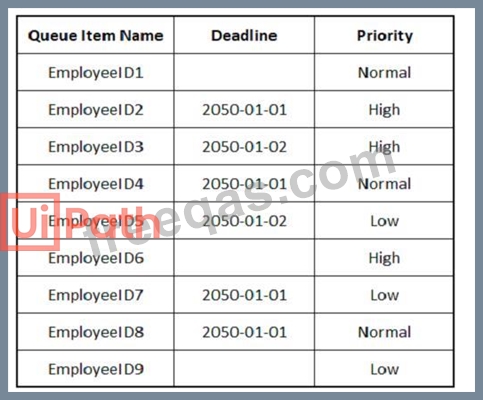
The provided exhibit displays the representation of the "Deadline" field using the yyyy-mm-dd format.

In what order should the Queue Items be processed by a single robot executing a Performer workflow?

Correct Answer:

Explanation
The Queue Items should be processed by a single robot executing a Performer workflow in the following order:
EmployeeID1
EmployeeID4
EmployeeID8
EmployeeID3
EmployeeID6
EmployeeID9
EmployeeID5
EmployeeID2
EmployeeID7
A queue is a container that holds an unlimited number of items that can be processed by a robot1. A queue item can have a deadline and a priority, which affect the order in which the robot retrieves the items from the queue2. The Performer workflow is a part of the REFramework template that processes the queue items using the Get Transaction Item activity3. The order of queue execution is determined by the following rules4:
Items that have a deadline are processed first, in order of priority and according to the set deadline for items with the same priority.
Items that have no deadline are processed next, in order of priority and according to the rule First In, First Out for items with the same priority.
Based on these rules and the exhibit, the order of queue execution is as follows:
EmployeeID1 has the earliest deadline (2050-01-01) and high priority, so it is processed first.
EmployeeID4 has the same deadline as EmployeeID1, but normal priority, so it is processed second.
EmployeeID8 has the same deadline and priority as EmployeeID4, but it was added later to the queue, so it is processed third.
EmployeeID3 has the next earliest deadline (2050-01-02) and high priority, so it is processed fourth.
EmployeeID6 has the same deadline as EmployeeID3, but normal priority, so it is processed fifth.
EmployeeID9 has the same deadline and priority as EmployeeID6, but it was added later to the queue, so it is processed sixth.
EmployeeID5 has no deadline, but high priority, so it is processed seventh.
EmployeeID2 has no deadline and normal priority, so it is processed eighth.
EmployeeID7 has no deadline and low priority, so it is processed ninth.
References:
About Queues and Transactions documentation from UiPath
Processing Order documentation from UiPath
Performer documentation from UiPath
Order processing queue forum post from UiPath Community
insert code

Question 94

Which Control Flow activity is suitable for a developer who needs to assess the value of a counter before executing the loop's body in a workflow?

Correct Answer: C
The While activity is a Control Flow activity that enables the developer to execute a specified part of the automation while a condition is met. The condition is evaluated before the loop body is executed, which means that the developer can assess the value of a counter or any other variable before performing the actions inside the loop. This type of activity can be useful to iterate through an array, a list, a data table, or any other collection of data, or to repeat an action until a certain value is reached or changed. The While activity can be found in the Activities panel, under Workflow > Control.
References:
While - UiPath Activities
While Activity - UiPath Studio
UiPath While Loop Tutorial with Examples - RPA Tutorial
insert code

Question 95

What is the main function of the UiPath Remote Runtime component?

Correct Answer: A
Explanation
The UiPath Remote Runtime component is a component that enables the communication between a remote application or desktop, such as Citrix Virtual Apps, and the dedicated UiPath extension, such as the UiPath Extension for Citrix or the UiPath Extension for Windows Remote Desktop. It gathers information about the targeted UI elements of the remote applications and sends them to the corresponding extension, so that selectors can be natively generated in UIExplorer1. This way, you can create and manage tasks and exchanges between users and external applications using the authentication process of the API provider2. The UiPath Remote Runtime component is required to establish the connection between an application or desktop server and a corresponding UiPath extension installed on a client machine, without having to rely on OCR and image recognition activities3.
References:
Studio - About UiPath Remote Runtime - UiPath Documentation Portal.
Integration Service - Connections - UiPath Documentation Portal.
UiPath UiPath Runtime - Citrix Ready Marketplace.
insert code
  • ««
  • «
  • …
  • 15
  • 16
  • 17
  • 18
  • 19
  • 20
  • 21
  • 22
  • 23
  • 24
  • …
  • »
  • »»
[×]

Download PDF File

Enter your email address to download UiPath.UiPath-ADAv1.v2024-05-27.q139 Dumps

Email:

FreeQAs

Our website provides the Largest and the most Latest vendors Certification Exam materials around the world.

Using dumps we provide to Pass the Exam, we has the Valid Dumps with passing guranteed just which you need.

  • DMCA
  • About
  • Contact Us
  • Privacy Policy
  • Terms & Conditions
©2026 FreeQAs

www.freeqas.com materials do not contain actual questions and answers from Cisco's certification exams.