FreeQAs
 Request Exam  Contact
  • Home
  • View All Exams
  • New QA's
  • Upload
PRACTICE EXAMS:
  • Oracle
  • Fortinet
  • IBM
  • Juniper
  • Microsoft
  • Cisco
  • Citrix
  • CompTIA
  • VMware
  • ISC
  • SAP
  • EMC
  • PMI
  • HP
  • Salesforce
  • Other
  • Oracle
    Oracle
  • Fortinet
    Fortinet
  • IBM
    IBM
  • Juniper
    Juniper
  • Microsoft
    Microsoft
  • Cisco
    Cisco
  • Citrix
    Citrix
  • CompTIA
    CompTIA
  • VMware
    VMware
  • ISC
    ISC
  • SAP
    SAP
  • EMC
    EMC
  • PMI
    PMI
  • HP
    HP
  • Salesforce
    Salesforce
  1. Home
  2. UiPath Certification
  3. UiPath-ADAv1 Exam
  4. UiPath.UiPath-ADAv1.v2024-05-27.q139 Dumps
  • ««
  • «
  • …
  • 16
  • 17
  • 18
  • 19
  • 20
  • 21
  • 22
  • 23
  • 24
  • 25
  • …
  • »
  • »»
Download Now

Question 96

A developer wants to add items to a list of strings using the Invoke Method activity. The list is declared as follows:


Based on the information shown in the exhibits, what is the outcome of the Invoke Method activity?

Correct Answer: C
The Invoke Method activity is used to add items to a list of strings. In this case, the list is declared as "Colors".
The outcome of the Invoke Method activity will be that the list "Colors" will contain an item with the value
"Yellow". This is because the TargetObject property is set to "Colors", which is the list variable, the MethodName property is set to "Add", which is the method of the list class, and the Parameters property is set to "Yellow", which is the value to be added to the list. (UiPath Studio documentation1) References:
1: Invoke Method - UiPath Activities.
insert code

Question 97

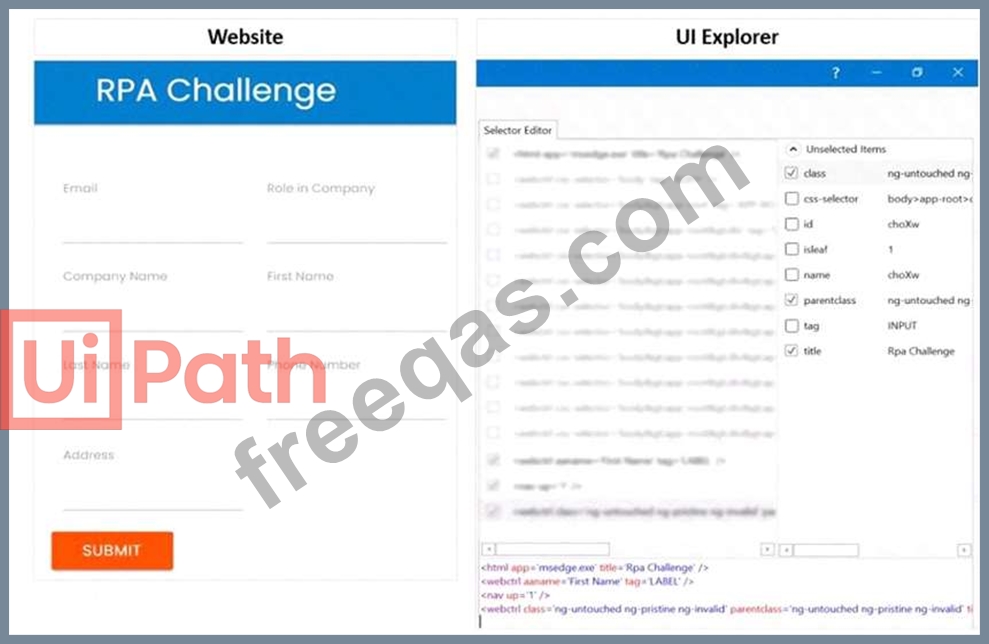
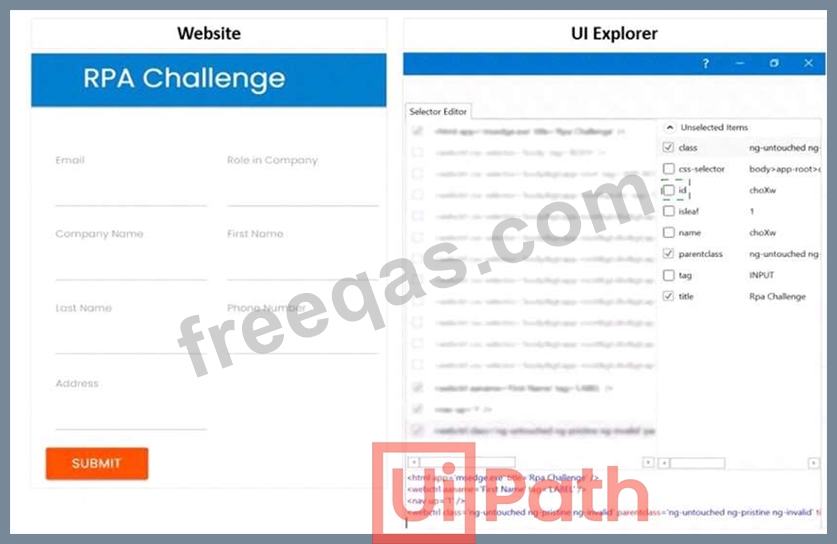
A developer is using a Type into activity to enter details into a web form The developer notices that the selector for the text field is unreliable. The selector that is shown in the exhibit currently targets both a text label and a text field at runtime Only one additional Property needs to be clicked to ensure the selector targets only the First Name text field at runtime.
Instructions: Click the additional Property checkbox in the following Ul Explorer "Unselected Items" column that should be used for the First Name text field.
Correct Answer:

Explanation
To ensure the selector targets only the First Name text field at runtime, you need to click the additional Property checkbox for ID in the UI Explorer Unselected Items column. This will add the ID attribute to the selector, which is a unique identifier for the text field element. The ID attribute has the value "firstname" for the First Name text field, as shown in the image. This will make the selector more reliable and specific, and avoid targeting the text label or other elements with the same class or tag.
https://docs.uipath.com/de/studio/standalone/2021.10/user-guide/uipath-explorer
insert code

Question 98

Which LINQ method is used to filter data in a List or Data Table based on a condition?

Correct Answer: B
The Where method is used to filter data in a List or Data Table based on a condition. It returns a new collection that contains only the elements that satisfy the condition12. The other methods are used for different purposes: OrderBy for sorting, GroupBy for grouping, and Select for projecting3.
References:
Linq query to filter datatable forum post, Answer by @ppr
How to use LINQ on a DataTable in Uipath forum post, Answer by @Dave
How to use LINQ [Basic to Advanced] in UiPath event description, Introduction section
insert code

Question 99

A developer is automating the process of entering sensitive information into text input fields that are constantly changing their position. Each text input field has a corresponding text label. The developer decides to automate the process by using Modern UI Activities with anchors.
Which activities should be used?

Correct Answer: A
The Find Text Position activity is used to find the position of a text on the screen and return it as a UiElement variable. This can be used as an anchor to locate the text input field that corresponds to the text label. The Type Secure Text activity is used to type a password or other sensitive information into a UI element, without revealing the actual text. The input text is provided as a SecureString variable, which is encrypted and cannot be viewed in plain text. This ensures that the sensitive information is entered securely and accurately into the text input field.
References:
Find Text Position - UiPath Activities
Type Secure Text - UiPath Activities
UiPath Anchor Base Tutorial & AnchorPosition Example
insert code

Question 100

A developer wants to create a process that searches for images on a website and then saves the images in a local folder However, the website contains an error. As a result, the process may need to search for an image multiple times in order for it to display.
Which container activity should the developer use to search for an image multiple times'?

Correct Answer: D
Explanation
The container activity that the developer should use to search for an image multiple times is Retry Scope. The Retry Scope activity is used to retry the execution of a set of activities as long as a condition is not met or an error is thrown. The Retry Scope activity has two sections: Action and Condition. The Action section contains the activities that need to be retried, such as searching for an image on a website. The Condition section contains an activity that returns a Boolean value, such as Image Exists, which checks if the image is displayed on the screen. The Retry Scope activity also has two properties: NumberOfRetries and RetryInterval. The NumberOfRetries property specifies how many times the Action section is retried before throwing an error. The RetryInterval property specifies how much time passes between each retry1. By using the Retry Scope activity, the developer can handle the error on the website and search for the image multiple times until it is found or the maximum number of retries is reached. References: Retry Scope from UiPath documentation.
insert code
  • ««
  • «
  • …
  • 16
  • 17
  • 18
  • 19
  • 20
  • 21
  • 22
  • 23
  • 24
  • 25
  • …
  • »
  • »»
[×]

Download PDF File

Enter your email address to download UiPath.UiPath-ADAv1.v2024-05-27.q139 Dumps

Email:

FreeQAs

Our website provides the Largest and the most Latest vendors Certification Exam materials around the world.

Using dumps we provide to Pass the Exam, we has the Valid Dumps with passing guranteed just which you need.

  • DMCA
  • About
  • Contact Us
  • Privacy Policy
  • Terms & Conditions
©2026 FreeQAs

www.freeqas.com materials do not contain actual questions and answers from Cisco's certification exams.
