FreeQAs
 Request Exam  Contact
  • Home
  • View All Exams
  • New QA's
  • Upload
PRACTICE EXAMS:
  • Oracle
  • Fortinet
  • IBM
  • Juniper
  • Microsoft
  • Cisco
  • Citrix
  • CompTIA
  • VMware
  • ISC
  • SAP
  • EMC
  • PMI
  • HP
  • Salesforce
  • Other
  • Oracle
    Oracle
  • Fortinet
    Fortinet
  • IBM
    IBM
  • Juniper
    Juniper
  • Microsoft
    Microsoft
  • Cisco
    Cisco
  • Citrix
    Citrix
  • CompTIA
    CompTIA
  • VMware
    VMware
  • ISC
    ISC
  • SAP
    SAP
  • EMC
    EMC
  • PMI
    PMI
  • HP
    HP
  • Salesforce
    Salesforce
  1. Home
  2. VMware Certification
  3. 2V0-41.23 Exam
  4. VMware.2V0-41.23.v2024-12-31.q117 Dumps
  • ««
  • «
  • …
  • 2
  • 3
  • 4
  • 5
  • 6
  • 7
  • 8
  • 9
  • 10
  • 11
  • …
  • »
  • »»
Download Now

Question 26

In which VPN type are the Virtual Tunnel interfaces (VTI) used?

Correct Answer: B
Route-based VPN is a VPN type that uses Virtual Tunnel interfaces (VTI) to establish IPSec tunnels between an NSX Edge node and remote sites2. A VTI is a logical interface that is assigned an IP address and is associated with a physical or virtual interface. The VTI acts as an end point of the IPSec tunnel and routes traffic between the NSX Edge node and the remote site2. Route & SSL based VPNs, Policy & Route based VPNs, and SSL-based VPN are not VPN types that use VTI. References: Virtual Private Network (VPN)
insert code

Question 27

When collecting support bundles through NSX Manager, which files should be excluded for potentially containing sensitive information?

Correct Answer: C,D
Explanation
According to the VMware NSX Documentation1, core files and audit logs can contain sensitive information and should be excluded from the support bundle unless requested by VMware technical support. Controller files and management files are not mentioned as containing sensitive information.
insert code

Question 28

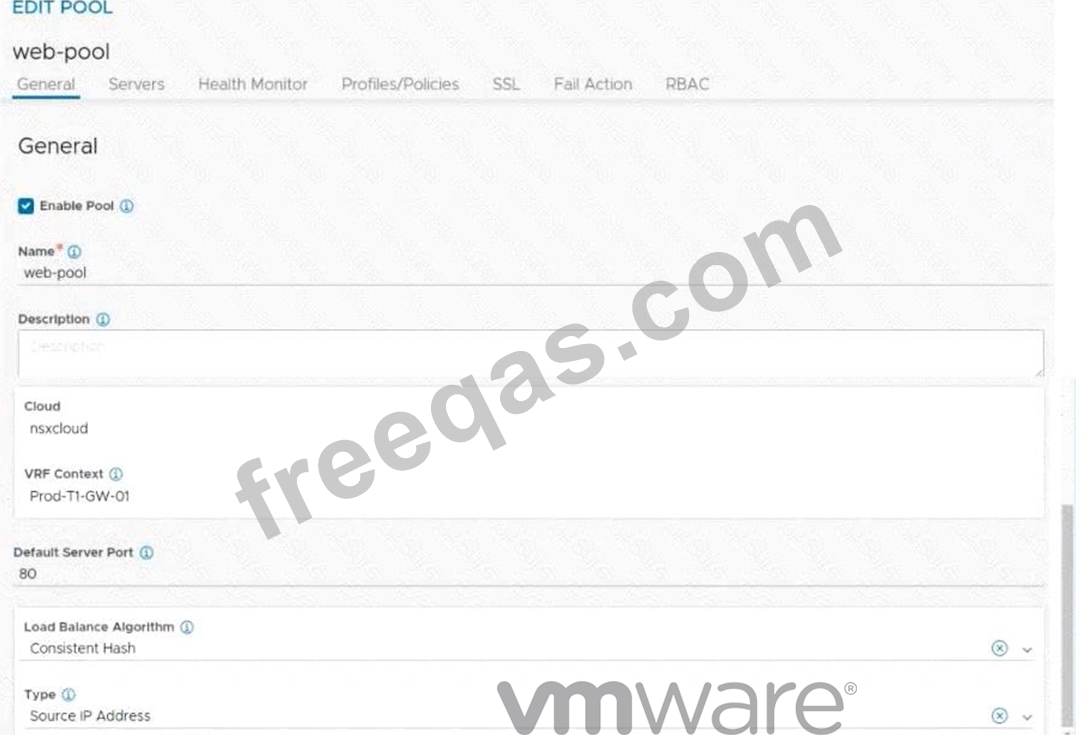
Refer to the exhibit.
An administrator configured NSX Advanced Load Balancer to redistribute the traffic between the web servers.
However, requests are sent to only one server
Which of the following pool configuration settings needs to be adjusted to resolve the problem? Mark the correct answer by clicking on the image.
Correct Answer:

Explanation
Load Balancing Algorithm
You specify the following parameters during the creation of a server pool:
* Name: A unique name for the server pool.
* Cloud: The cloud connector details for the NSX environment.
* VRF Context: Virtual Routing Framework (VRF) is a method to isolate traffic in a system. VRF is also called a route domain in the load balancer community. A global VRF context is created by default. Network administrators might create custom VRF contexts to isolate traffic between different tenants or subsets.
* Default Server Port: New connections to servers will use this destination service port. The default port is 80.
* Load-balancing algorithm: The selected load-balancing algorithm controls how the incoming connections are distributed among the servers in the pool.
* Tier-1 gateway (logical router): Specify the Tier-1 gateway that you want to attach the server pool to. This value matches the Tier-1 gateway specified for the virtual service and VIP.
insert code

Question 29

When deploying an NSX Edge Transport Node, what two valid IP address assignment options should be specified for the TEP IP addresses? (Choose two.)

Correct Answer: A,D
Explanation
When deploying an NSX Edge Transport Node, two valid IP address assignment options that should be specified for the TEP IP addresses are Use an IP Pool and Use a Static IP List. These options allow the user to assign TEP IP addresses from a predefined range of IP addresses or a manually entered list of IP addresses, respectively345. The other options are incorrect because they are not supported methods for assigning TEP IP addresses. There is no option to use a DHCP server, RADIUS, or BootP for TEP IP address assignment in NSX-T345. References: NSX-T Edge TEP networking options, Multi-TEP High Availability, Create an IP Pool for Host Tunnel Endpoint IP Addresses
insert code

Question 30

Where in the NSX UI would an administrator set the time attribute for a time-based Gateway Firewall rule?


Correct Answer: D
Explanation
According to the VMware documentation1, the clock icon appears on the firewall policy section that you want to have a time window. By clicking the clock icon, you can create or select a time window that applies to all the rules in that policy section. The other options are incorrect because they either do not exist or are not related to the time-based rule feature. There is no option to set a time-based rule in the rule itself, as it is a policy-level setting. There is also an option to set a time-based rule in the NSX UI, so it does not require using the command line interface.
https://docs.vmware.com/en/VMware-NSX/4.1/administration/GUID-8572496E-A60E-48C3-A016-4A081AC80
insert code
  • ««
  • «
  • …
  • 2
  • 3
  • 4
  • 5
  • 6
  • 7
  • 8
  • 9
  • 10
  • 11
  • …
  • »
  • »»
[×]

Download PDF File

Enter your email address to download VMware.2V0-41.23.v2024-12-31.q117 Dumps

Email:

FreeQAs

Our website provides the Largest and the most Latest vendors Certification Exam materials around the world.

Using dumps we provide to Pass the Exam, we has the Valid Dumps with passing guranteed just which you need.

  • DMCA
  • About
  • Contact Us
  • Privacy Policy
  • Terms & Conditions
©2026 FreeQAs

www.freeqas.com materials do not contain actual questions and answers from Cisco's certification exams.