FreeQAs
 Request Exam  Contact
  • Home
  • View All Exams
  • New QA's
  • Upload
PRACTICE EXAMS:
  • Oracle
  • Fortinet
  • Juniper
  • Microsoft
  • Cisco
  • Citrix
  • CompTIA
  • VMware
  • SAP
  • EMC
  • PMI
  • HP
  • Salesforce
  • Other
  • Oracle
    Oracle
  • Fortinet
    Fortinet
  • Juniper
    Juniper
  • Microsoft
    Microsoft
  • Cisco
    Cisco
  • Citrix
    Citrix
  • CompTIA
    CompTIA
  • VMware
    VMware
  • SAP
    SAP
  • EMC
    EMC
  • PMI
    PMI
  • HP
    HP
  • Salesforce
    Salesforce
  1. Home
  2. Databricks Certification
  3. Associate-Developer-Apache-Spark-3.5 Exam
  4. Databricks.Associate-Developer-Apache-Spark-3.5.v2025-11-20.q72 Dumps
  • ««
  • «
  • …
  • 7
  • 8
  • 9
  • 10
  • 11
  • 12
  • 13
  • 14
  • 15
  • 16
  • »
Download Now

Question 61

A developer is working with a pandas DataFrame containing user behavior data from a web application.
Which approach should be used for executing a groupBy operation in parallel across all workers in Apache Spark 3.5?
A)
Use the applylnPandas API
B)

C)

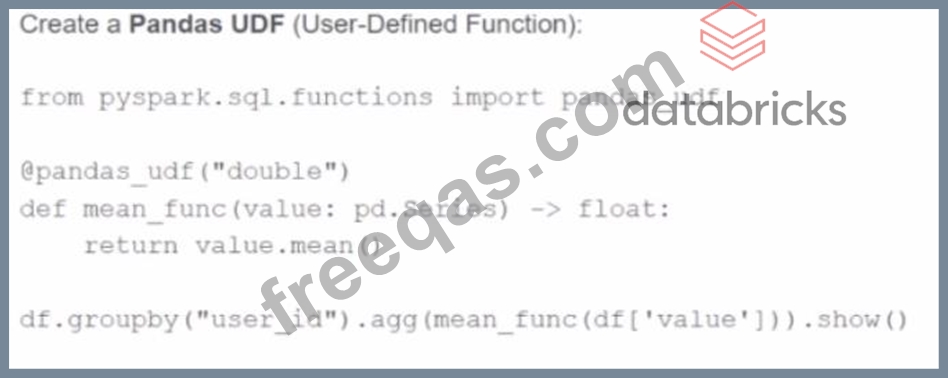
Correct Answer: A
The correct approach to perform a parallelized groupBy operation across Spark worker nodes using Pandas API is via applyInPandas. This function enables grouped map operations using Pandas logic in a distributed Spark environment. It applies a user-defined function to each group of data represented as a Pandas DataFrame.
As per the Databricks documentation:
"applyInPandas() allows for vectorized operations on grouped data in Spark. It applies a user-defined function to each group of a DataFrame and outputs a new DataFrame. This is the recommended approach for using Pandas logic across grouped data with parallel execution." Option A is correct and achieves this parallel execution.
Option B (mapInPandas) applies to the entire DataFrame, not grouped operations.
Option C uses built-in aggregation functions, which are efficient but not customizable with Pandas logic.
Option D creates a scalar Pandas UDF which does not perform a group-wise transformation.
Therefore, to run a groupBy with parallel Pandas logic on Spark workers, Option A using applyInPandas is the only correct answer.
insert code

Question 62

Given:
python
CopyEdit
spark.sparkContext.setLogLevel("<LOG_LEVEL>")
Which set contains the suitable configuration settings for Spark driver LOG_LEVELs?

Correct Answer: B
Comprehensive and Detailed Explanation From Exact Extract:
ThesetLogLevel()method ofSparkContextsets the logging level on the driver, which controls the verbosity of logs emitted during job execution. Supported levels are inherited from log4j and include the following:
ALL
DEBUG
ERROR
FATAL
INFO
OFF
TRACE
WARN
According to official Spark and Databricks documentation:
"Valid log levels include: ALL, DEBUG, ERROR, FATAL, INFO, OFF, TRACE, and WARN." Among the choices provided, only option B (ERROR, WARN, TRACE, OFF) includes four valid log levels and excludes invalid ones like "FAIL" or "NONE".
Reference: Apache Spark API docs # SparkContext.setLogLevel
insert code

Question 63

A data engineer needs to write a Streaming DataFrame as Parquet files.
Given the code:

Which code fragment should be inserted to meet the requirement?
A)

B)

C)

D)

Which code fragment should be inserted to meet the requirement?

Correct Answer: D
To write a structured streaming DataFrame to Parquet files, the correct way to specify the format and output directory is:
.writeStream
.format("parquet")
.option("path", "path/to/destination/dir")
According to Spark documentation:
"When writing to file-based sinks (like Parquet), you must specify the path using the .option("path", ...) method. Unlike batch writes, .save() is not supported." Option A incorrectly uses .option("location", ...) (invalid for Parquet sink).
Option B incorrectly sets the format via .option("format", ...), which is not the correct method.
Option C repeats the same issue.
Option D is correct: .format("parquet") + .option("path", ...) is the required syntax.
Final answer: D
insert code

Question 64

A data scientist at a financial services company is working with a Spark DataFrame containing transaction records. The DataFrame has millions of rows and includes columns fortransaction_id,account_number, transaction_amount, andtimestamp. Due to an issue with the source system, some transactions were accidentally recorded multiple times with identical information across all fields. The data scientist needs to remove rows with duplicates across all fields to ensure accurate financial reporting.
Which approach should the data scientist use to deduplicate the orders using PySpark?

Correct Answer: A
dropDuplicates() with no column list removes duplicates based on all columns.
It's the most efficient and semantically correct way to deduplicate records that are completely identical across all fields.
From the PySpark documentation:
dropDuplicates(): Return a new DataFrame with duplicate rows removed, considering all columns if none are specified.
- Source:PySpark DataFrame.dropDuplicates() API
insert code

Question 65

A data engineer has been asked to produce a Parquet table which is overwritten every day with the latest data. The downstream consumer of this Parquet table has a hard requirement that the data in this table is produced with all records sorted by the market_time field.
Which line of Spark code will produce a Parquet table that meets these requirements?

Correct Answer: D
To ensure that data written out to disk is sorted, it is important to consider how Spark writes data when saving to Parquet tables. The methods .sort() or .orderBy() apply a global sort but do not guarantee that the sorting will persist in the final output files unless certain conditions are met (e.g. a single partition via .coalesce(1) - which is not scalable).
Instead, the proper method in distributed Spark processing to ensure rows are sorted within their respective partitions when written out is:
.sortWithinPartitions("column_name")
According to Apache Spark documentation:
"sortWithinPartitions() ensures each partition is sorted by the specified columns. This is useful for downstream systems that require sorted files." This method works efficiently in distributed settings, avoids the performance bottleneck of global sorting (as in .orderBy() or .sort()), and guarantees each output partition has sorted records - which meets the requirement of consistently sorted data.
Thus:
Option A and B do not guarantee the persisted file contents are sorted.
Option C introduces a bottleneck via .coalesce(1) (single partition).
Option D correctly applies sorting within partitions and is scalable.
insert code
  • ««
  • «
  • …
  • 7
  • 8
  • 9
  • 10
  • 11
  • 12
  • 13
  • 14
  • 15
  • 16
  • »
[×]

Download PDF File

Enter your email address to download Databricks.Associate-Developer-Apache-Spark-3.5.v2025-11-20.q72 Dumps


Email:

FreeQAs

Our website provides the Largest and the most Latest vendors Certification Exam materials around the world.

Using dumps we provide to Pass the Exam, we has the Valid Dumps with passing guranteed just which you need.

  • DMCA
  • About
  • Contact Us
  • Privacy Policy
  • Terms & Conditions
©2026 FreeQAs

www.freeqas.com materials do not contain actual questions and answers from Cisco's certification exams.