You must connect to the correct host. Failure to do so may result in a zero score. [candidate@base] $ ssh Cka000056 Task Review and apply the appropriate NetworkPolicy from the provided YAML samples. Ensure that the chosen NetworkPolicy is not overly permissive, but allows communication between the frontend and backend Deployments, which run in the frontend and backend namespaces respectively. First, analyze the frontend and backend Deployments to determine the specific requirements for the NetworkPolicy that needs to be applied. Next, examine the NetworkPolicy YAML samples located in the ~/netpol folder. Failure to comply may result in a reduced score. Do not delete or modify the provided samples. Only apply one of them. Finally, apply the NetworkPolicy that enables communication between the frontend and backend Deployments, without being overly permissive.
Correct Answer:
Task Summary * Connect to host cka000056 * Review existing frontend and backend Deployments * Choose one correct NetworkPolicy from the ~/netpol directory * The policy must: * Allow traffic only from the frontend Deployment to the backend Deployment * Avoid being overly permissive * Apply the correct NetworkPolicy without modifying any sample files Step-by-Step Instructions Step 1: SSH into the correct node ssh cka000056 Step 2: Inspect the frontend Deployment Check the labels used in the frontend Deployment: kubectl get deployment -n frontend -o yaml Look under metadata.labels or spec.template.metadata.labels. Note the app or similar label (e.g., app: frontend). Step 3: Inspect the backend Deployment kubectl get deployment -n backend -o yaml Again, find the labels assigned to the pods (e.g., app: backend). Step 4: List and review the provided NetworkPolicies List the available files: ls ~/netpol Check the contents of each policy file: cat ~/netpol/<file-name>.yaml Look for a policy that: * Has kind: NetworkPolicy * Applies to the backend namespace * Uses a podSelector that matches the backend pods * Includes an ingress.from rule that references the frontend namespace using a namespaceSelector (and optionally a podSelector) * Does not allow traffic from all namespaces or all pods Here's what to look for in a good match: apiVersion: networking.k8s.io/v1 kind: NetworkPolicy metadata: name: allow-frontend-to-backend namespace: backend spec: podSelector: matchLabels: app: backend ingress: - from: - namespaceSelector: matchLabels: name: frontend Even better if the policy includes: - namespaceSelector: matchLabels: name: frontend podSelector: matchLabels: app: frontend This limits access to pods in the frontend namespace with a specific label. Step 5: Apply the correct NetworkPolicy Once you've identified the best match, apply it: kubectl apply -f ~/netpol/<chosen-file>.yaml Apply only one file. Do not alter or delete any existing sample. ssh cka000056 kubectl get deployment -n frontend -o yaml kubectl get deployment -n backend -o yaml ls ~/netpol cat ~/netpol/*.yaml # Review carefully kubectl apply -f ~/netpol/<chosen-file>.yaml Command Summary ssh cka000056 kubectl get deployment -n frontend -o yaml kubectl get deployment -n backend -o yaml ls ~/netpol cat ~/netpol/*.yaml # Review carefully kubectl apply -f ~/netpol/<chosen-file>.yaml
Question 62
Undo the deployment to the previous version 1.17.1 and verify Image has the previous version
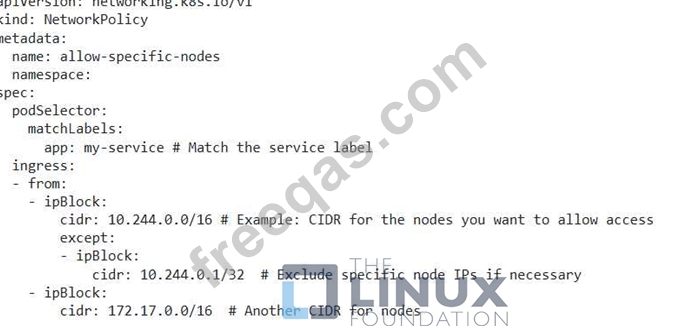
You have a 'NodePort' service named 'my-service' exposed on port 30000. You need to configure a NetworkPolicy to only allow access to the service from specific nodes in the cluster based on their node labels.
Correct Answer:
See the solution below with Step by Step Explanation. Explanation: Solution (Step by Step) : 1. Create a NetworkPolicy: - Define a NetworkPolicy that allows traffic from nodes with specific labels to the service. 2. Apply the NetworkPolicy: - Apply the YAML file using 'kubectl apply -f networkpolicy.yaml'. 3. Verify the NetworkPolicy: - Check the status of the NetworkPolicy using 'kubectl get networkpolicies allow-specific-nodes -n . 4. Test: - Access the service using the 'NodePort' on a node with the specified label. You should be able to access the service. - Access the service using the 'NodePort' on a node that does not have the specified label. You should not be able to access the service. Note: - Replace with the actual namespace where your service is located. - Replace the CIDR values with the actual CIDRs of your nodes or the node labels that you want to use for filtering.,
Question 64
Create a Cronjob with busybox image that prints date and hello from kubernetes cluster message for every minute
Correct Answer: A
Question 65
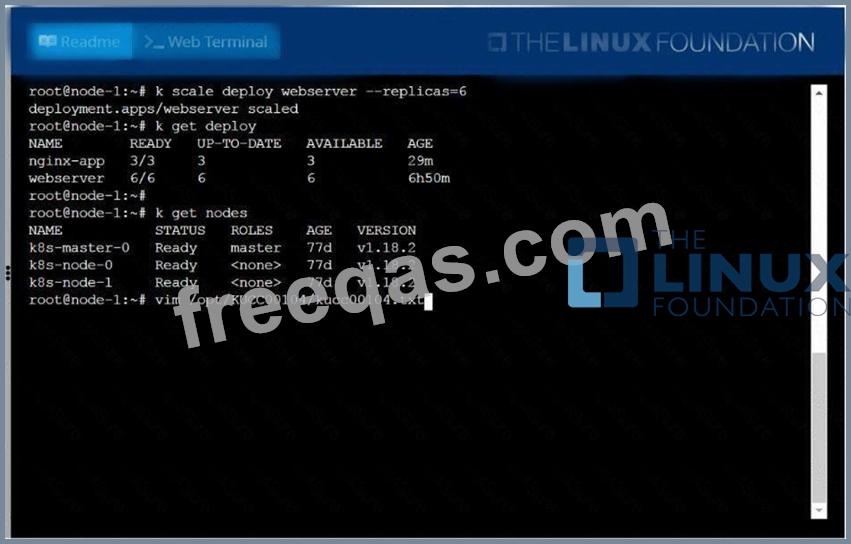
Check to see how many worker nodes are ready (not including nodes tainted NoSchedule) and write the number to /opt/KUCC00104/kucc00104.txt.