FreeQAs
 Request Exam  Contact
  • Home
  • View All Exams
  • New QA's
  • Upload
PRACTICE EXAMS:
  • Oracle
  • Fortinet
  • Juniper
  • Microsoft
  • Cisco
  • Citrix
  • CompTIA
  • VMware
  • ISC
  • SAP
  • EMC
  • PMI
  • HP
  • Salesforce
  • Other
  • Oracle
    Oracle
  • Fortinet
    Fortinet
  • Juniper
    Juniper
  • Microsoft
    Microsoft
  • Cisco
    Cisco
  • Citrix
    Citrix
  • CompTIA
    CompTIA
  • VMware
    VMware
  • ISC
    ISC
  • SAP
    SAP
  • EMC
    EMC
  • PMI
    PMI
  • HP
    HP
  • Salesforce
    Salesforce
  1. Home
  2. Linux Foundation Certification
  3. CKA Exam
  4. LinuxFoundation.CKA.v2026-10-12.q90 Dumps
  • ««
  • «
  • …
  • 10
  • 11
  • 12
  • 13
  • 14
  • 15
  • 16
  • 17
  • 18
  • 19
  • »
Download Now

Question 76

Explain the concept of "volume mode" for PersistentVolumes and how it differs between "Block" and "Filesystem" mode. Provide examples of when each mode would be most suitable.

Correct Answer:
See the solution below with Step by Step Explanation.
Explanation:
Solution (Step by Step) :
Volume Mode:
The volume mode defines how a PersistentVolume is presented to the pods. It specifies whether the volume is exposed as a block device or a file system.
Block Mode:
- Description: Presents the volume as a block device directly to the pod. This allows for low-level access and control over the storage.
- Suitable for:
- Databases requiring direct block access (e.g., MySQL, PostgreSQL)
- Applications that need to directly manage the storage layout
- High-performance storage scenarios where low-level access is beneficial Filesystem Mode:
- Description: Presents the volume as a file system to the pod. This allows for accessing the storage through standard file system operations.
- Suitable for:
- General-purpose applications requiring file system-based storage
- Applications that store data in files and directories (e.g., web servers, application code)
- Scenarios where simplicity and ease of use are prioritized
Example:
- Block Mode: A MySQL database pod would utilize a block volume to ensure low-level control over the storage, optimize performance, and manage data files efficiently.
- Filesystem Mode: A web server pod storing website files and logs would typically use a file system volume for ease of access and management.
insert code

Question 77

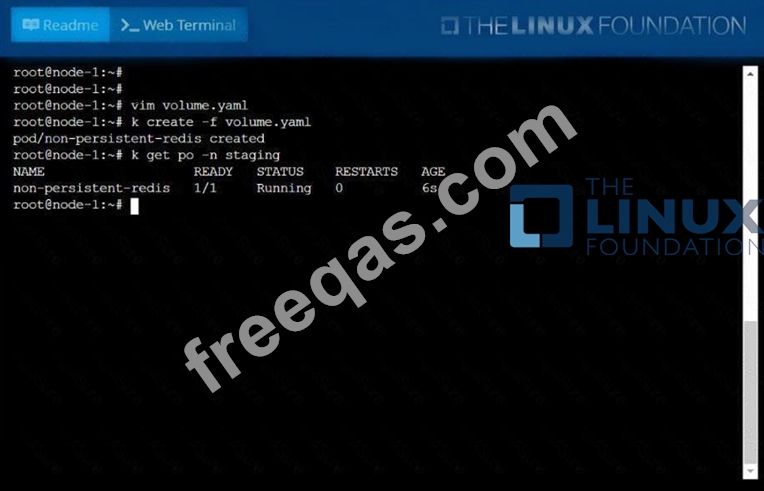
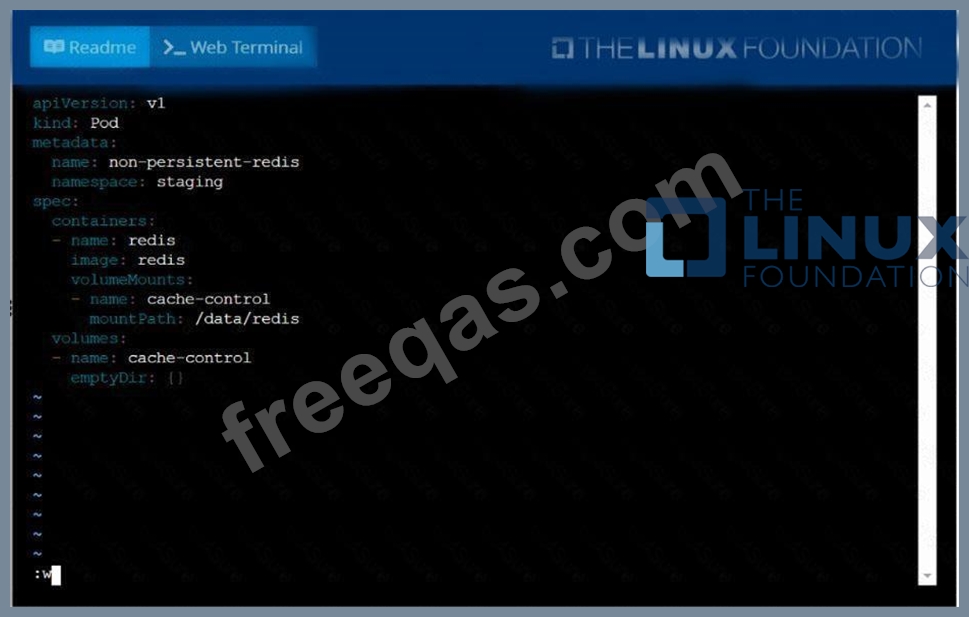
Create a pod as follows:
* Name: non-persistent-redis
* container Image: redis
* Volume with name: cache-control
* Mount path: /data/redis
The pod should launch in the staging namespace and the volume must not be persistent.
Correct Answer:
See the solution below.
Explanation
solution


insert code

Question 78

Score:7%

Context
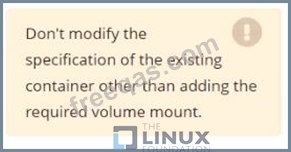
An existing Pod needs to be integrated into the Kubernetes built-in logging architecture (e. g. kubectl logs). Adding a streaming sidecar container is a good and common way to accomplish this requirement.
Task
Add a sidecar container named sidecar, using the busybox Image, to the existing Pod big-corp-app. The new sidecar container has to run the following command:
/bin/sh -c tail -n+1 -f /va r/log/big-corp-app.log
Use a Volume, mounted at /var/log, to make the log file big-corp-app.log available to the sidecar container.
Correct Answer:
Solution:
#
kubectl get pod big-corp-app -o yaml
#
apiVersion: v1
kind: Pod
metadata:
name: big-corp-app
spec:
containers:
- name: big-corp-app
image: busybox
args:
- /bin/sh
- -c
- >
i=0;
while true;
do
echo "$(date) INFO $i" >> /var/log/big-corp-app.log;
i=$((i+1));
sleep 1;
done
volumeMounts:
- name: logs
mountPath: /var/log
- name: count-log-1
image: busybox
args: [/bin/sh, -c, 'tail -n+1 -f /var/log/big-corp-app.log']
volumeMounts:
- name: logs
mountPath: /var/log
volumes:
- name: logs
emptyDir: {
}
#
kubectl logs big-corp-app -c count-log-1
insert code

Question 79

For this item, you will have to ssh to the nodes ik8s-master-0 and ik8s-node-0 and complete all tasks on these nodes. Ensure that you return to the base node (hostname: node-1) when you have completed this item.
Context
As an administrator of a small development team, you have been asked to set up a Kubernetes cluster to test the viability of a new application.
Task You must use kubeadm to perform this task. Any kubeadm invocations will require the use of the --ignore-preflight-errors=all option.
Configure the node ik8s-master-O as a master node. .
Join the node ik8s-node-o to the cluster.

Correct Answer:
solution
You must use the kubeadm configuration file located at /etc/kubeadm.conf when initializing your cluster.
You may use any CNI plugin to complete this task, but if you don't have your favourite CNI plugin's manifest URL at hand, Calico is one popular option: https://docs.projectcalico.org/v3.14/manifests/calico.yaml Docker is already installed on both nodes and apt has been configured so that you can install the required tools.
insert code

Question 80

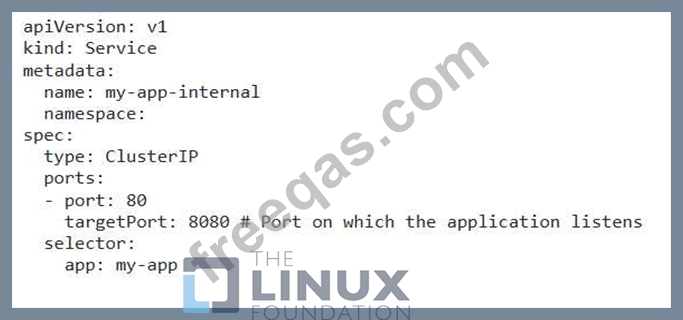
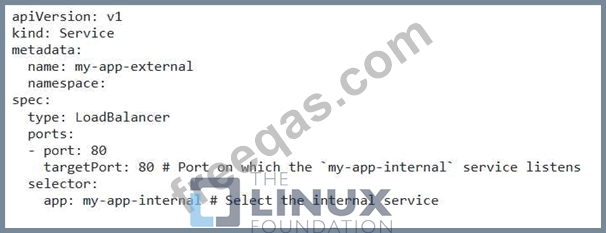
You have a Deployment named 'my-app' running a web application with three replicas. The application is exposed using a 'LoadBalancer' service. You want to create a 'ClusterlP' service for internal communication within the Kubernetes cluster and route traffic from the 'LoadBalancer' service to the 'ClusterlP' service.
Correct Answer:
See the solution below with Step by Step Explanation.
Explanation:
Solution (Step by Step) :
1 . Create the ClusterlP service:
- Define a 'ClusterlP' service that points to the my-app' Deployment.

2. Create the LoadBalancer service: - Define a 'LoadBalancer service that routes traffic to the my-app-internar service.

3. Apply the Service YAMLs: - Apply the YAML files for both services using 'kubectl apply -f my-app-internal.yamP and 'kubectl apply -f my- app-external.yamr. 4. Verify the Services: - Check the status of both services using 'kubectl get services'. You should see the 'my-app-internal' service with a 'ClusterlP' and the my-app-external' service with an external IP address. 5. Test the Routing: - Access the application through the external IP address of the 'my-app-external' service. The traffic should be routed to the 'my-app-internal' service and then to the my-app' Deployment. Note: Replace with the actual namespace where your Deployment and Services are located.
insert code
  • ««
  • «
  • …
  • 10
  • 11
  • 12
  • 13
  • 14
  • 15
  • 16
  • 17
  • 18
  • 19
  • »
[×]

Download PDF File

Enter your email address to download LinuxFoundation.CKA.v2026-10-12.q90 Dumps

Email:

FreeQAs

Our website provides the Largest and the most Latest vendors Certification Exam materials around the world.

Using dumps we provide to Pass the Exam, we has the Valid Dumps with passing guranteed just which you need.

  • DMCA
  • About
  • Contact Us
  • Privacy Policy
  • Terms & Conditions
©2026 FreeQAs

www.freeqas.com materials do not contain actual questions and answers from Cisco's certification exams.