FreeQAs
 Request Exam  Contact
  • Home
  • View All Exams
  • New QA's
  • Upload
PRACTICE EXAMS:
  • Oracle
  • Fortinet
  • Juniper
  • Microsoft
  • Cisco
  • Citrix
  • CompTIA
  • VMware
  • ISC
  • SAP
  • EMC
  • PMI
  • HP
  • Salesforce
  • Other
  • Oracle
    Oracle
  • Fortinet
    Fortinet
  • Juniper
    Juniper
  • Microsoft
    Microsoft
  • Cisco
    Cisco
  • Citrix
    Citrix
  • CompTIA
    CompTIA
  • VMware
    VMware
  • ISC
    ISC
  • SAP
    SAP
  • EMC
    EMC
  • PMI
    PMI
  • HP
    HP
  • Salesforce
    Salesforce
  1. Home
  2. Linux Foundation Certification
  3. CKA Exam
  4. LinuxFoundation.CKA.v2026-10-12.q90 Dumps
  • ««
  • «
  • …
  • 10
  • 11
  • 12
  • 13
  • 14
  • 15
  • 16
  • 17
  • 18
  • 19
Download Now

Question 86

Change the label for one of the pod to env=uat and list all the pods to verify

Correct Answer:
kubectl label pod/nginx-dev3 env=uat --overwrite kubectl get pods --show-labels
insert code

Question 87

Scale down the deployment to 1 replica

Correct Answer:
kubectl scale deployment webapp -replicas=1 //Verify kubectl get deploy kubectl get po,rs
insert code

Question 88

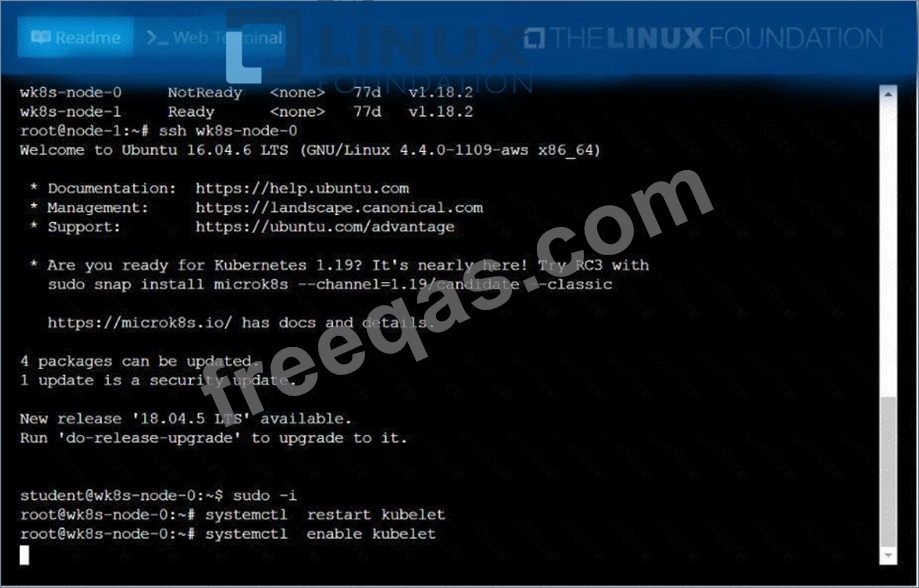
A Kubernetes worker node, named .Investigate why this is the case,
andperform any appropriate steps tobring the node to a state,ensuring that any changes are madepermanent.
You cansshto the failednode using:
[student@node-1] $ | sshWk8s-node-0
You can assume elevatedprivileges on the node with thefollowing command:
[student@w8ks-node-0] $ |sudo -i

Correct Answer:
See the solution below.
Explanation
solution


insert code

Question 89

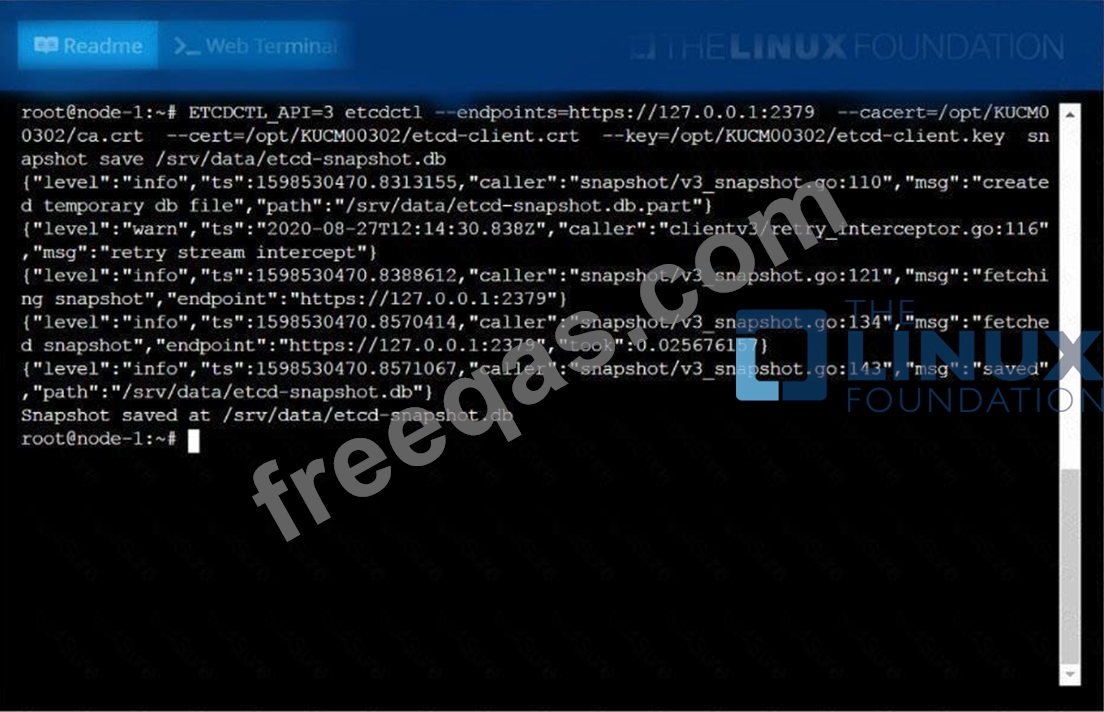
Create a snapshot of theetcdinstance running at , saving thesnapshot to the file path
/srv/data/etcd-snapshot.db.
The following TLScertificates/key are suppliedfor connecting to the server withetcdctl:
* CA certificate:/opt/KUCM00302/ca.crt
* Client certificate:/opt/KUCM00302/etcd-client.crt
* Client key:Topt/KUCM00302/etcd-client.key
Correct Answer:
See the solution below.
Explanation
solution
insert code

Question 90

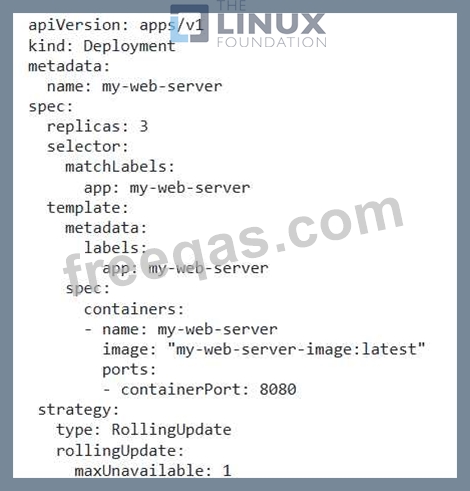
You have a deployment that runs multiple replicas of a web server application. You need to ensure that the Deployment always maintains at least 2 replicas available, even if one or more pods are deleted or become unavailable. How can you configure the Deployment to achieve this using the 'maxUnavailable' field in the 'strategy.rollingUpdate' section?
Correct Answer:
See the solution below with Step by Step Explanation.
Explanation:
Solution (Step by Step) :
1. Define the Deployment with maxUnavailable': Define a Deployment YAML file with 'replicas: 3', indicating that you want three replicas of the web server application. Then, in the 'strategy.rollinglJpdate' section, set the 'maxUnavailable' field to '1'.

2. Apply the Deployment: Apply the YAML file to your cluster using 'kubectl apply -f my-web-server.yamr. The deployment will create three replicas of your web server application. 3. Test the 'maxUnavailable' Configuration: Delete or terminate one of the pods in the Deployment. The Deployment will automatically create a new pod to replace the deleted or unavailable one, ensuring that at least two replicas are always available. You can monitor the status of the deployment using 'kubectl get pods -l app=my-web-server'. You should see that two pods are consistently running, while the third is being replaced.
insert code
  • ««
  • «
  • …
  • 10
  • 11
  • 12
  • 13
  • 14
  • 15
  • 16
  • 17
  • 18
  • 19
[×]

Download PDF File

Enter your email address to download LinuxFoundation.CKA.v2026-10-12.q90 Dumps

Email:

FreeQAs

Our website provides the Largest and the most Latest vendors Certification Exam materials around the world.

Using dumps we provide to Pass the Exam, we has the Valid Dumps with passing guranteed just which you need.

  • DMCA
  • About
  • Contact Us
  • Privacy Policy
  • Terms & Conditions
©2026 FreeQAs

www.freeqas.com materials do not contain actual questions and answers from Cisco's certification exams.