FreeQAs
 Request Exam  Contact
  • Home
  • View All Exams
  • New QA's
  • Upload
PRACTICE EXAMS:
  • Oracle
  • Fortinet
  • IBM
  • Juniper
  • Microsoft
  • Cisco
  • Citrix
  • CompTIA
  • VMware
  • ISC
  • SAP
  • EMC
  • PMI
  • HP
  • Salesforce
  • Other
  • Oracle
    Oracle
  • Fortinet
    Fortinet
  • IBM
    IBM
  • Juniper
    Juniper
  • Microsoft
    Microsoft
  • Cisco
    Cisco
  • Citrix
    Citrix
  • CompTIA
    CompTIA
  • VMware
    VMware
  • ISC
    ISC
  • SAP
    SAP
  • EMC
    EMC
  • PMI
    PMI
  • HP
    HP
  • Salesforce
    Salesforce
  1. Home
  2. UiPath Certification
  3. UiPath-ADAv1 Exam
  4. UiPath.UiPath-ADAv1.v2024-05-27.q139 Dumps
  • ««
  • «
  • …
  • 20
  • 21
  • 22
  • 23
  • 24
  • 25
  • 26
  • 27
  • 28
  • 29
  • »
Download Now

Question 116

A developer initialized a String array, listOfMonthsByQuarter = {"1", "2", "3"} Which data type and value are retrieved when listOfMonthsByQuarter(2) is used at runtime?

Correct Answer: D
Explanation
The listOfMonthsByQuarter variable is a String array, which means it can store multiple values of type String.
Each value in the array has an index, which is a number that indicates its position in the array. The index starts from 0, so the first value has index 0, the second value has index 1, and so on. To access a specific value in the array, we can use the syntax arrayName(index). For example, listOfMonthsByQuarter(0) will return the first value in the array, which is "1". Similarly, listOfMonthsByQuarter(2) will return the third value in the array, which is "3". Therefore, the data type of listOfMonthsByQuarter(2) is String, and the value is
"3". References: Arrays and Variables from UiPath documentation.
insert code

Question 117

A developer published a process to UiPath Orchestrator with only the Mam.xaml workflow file. There is one
"In" argument of type String in the Main.xaml file with a default value of String.Empty When running the process from the Start Job window in Orchestrator what is the value of the argument at runtime?

Correct Answer: C
UiPath Orchestrator is a web application that enables you to deploy, monitor, and manage UiPath Robots and processes. When you publish a process from UiPath Studio to UiPath Orchestrator, you can define input and output arguments for the process. Input arguments are used to pass data from Orchestrator to the process, while output arguments are used to pass data from the process to Orchestrator. When you run a process from the Start Job window in Orchestrator, you can provide values for the input arguments in the Input section. If you do not provide any values, the default values of the input arguments are used. The default values are defined in UiPath Studio when you create the arguments. In this case, the process has one "In" argument of type String in the Main.xaml file with a default value of String.Empty. This means that when you run the process from Orchestrator, you can either provide a value for the argument in the Input section, or leave it blank. If you provide a value, that value will be used by the process. If you leave it blank, the default value of String.Empty will be used by the process. Therefore, the answer is C. Any input arguments provided in Orchestrator are used, otherwise the default value of String.Empty will be used. References: About Input and Output Arguments, Arguments
insert code

Question 118

Which logging level includes the following information by default?
1. Execution Started log entry - generated every time a process is started.
2. Execution Ended log entry - generated every time a process is finalized.
3. Transaction Started log entry - generated every time a transaction item is obtained by the robot from Orchestrator.
4. Transaction Ended log entry - generated every time the robot sets the transaction status to either Success or Failed.
5. Activity Information log entry - generated every time an activity is started, faulted or finished inside a workflow.
6. Arguments and Variables Information log entry - show values of the variables and arguments that are used.

Correct Answer: C
The Verbose logging level includes all the information that is logged by the other levels, plus the values of the variables and arguments that are used in the process1. By default, the Verbose level includes the following log entries2:
Execution Started
Execution Ended
Transaction Started
Transaction Ended
Activity Information
Arguments and Variables Information
https://docs.uipath.com/robot/standalone/2023.4/user-guide/logging-and-log-levels
insert code

Question 119

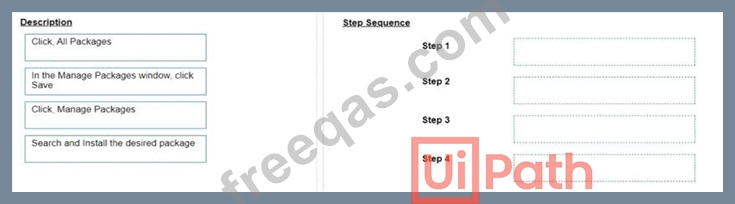
What is the correct sequence of steps to install a new Activities package in UiPath Studio 2021 10?
Instructions:
Drag the Description found on the left and drop on the correct Step found on the right.
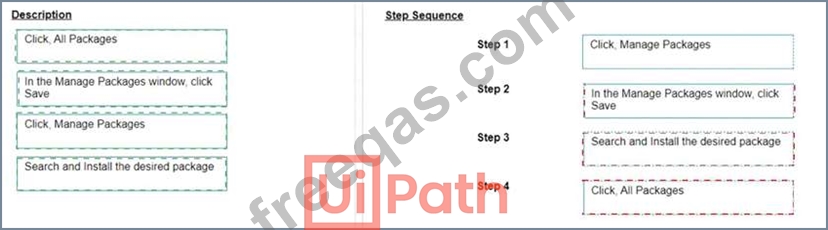
Correct Answer:

Explanation
Click, Manage Packages
In the Manage Packages window, click Save
Search and Install the desired package
Click, All Packages
The correct sequence of steps to install a new Activities package in UiPath Studio 2021 10 is:
Click Manage Packages in the ribbon.
In the Manage Packages window, click All Packages in the left panel.
Search for the desired package in the search box and select it from the list.
Click Install and then Save to complete the installation.
Comprehensive and Detailed Explanation: To install a new Activities package in UiPath Studio 2021 10, you need to follow these steps:
Click Manage Packages in the ribbon. This will open the Manage Packages window, where you can browse, install, update, or remove packages from your project.
In the Manage Packages window, click All Packages in the left panel. This will display all the available packages from the official UiPath feed, as well as any other feeds that you have configured in the Settings tab.
Search for the desired package in the search box and select it from the list. You can also filter the packages by category, compatibility, or source. You can see the package details, such as version, description, dependencies, and release notes, in the right panel.
Click Install and then Save to complete the installation. The package will be added to your project dependencies and downloaded to the local cache. You can also choose to install a specific version of the package by clicking on the version number and selecting from the drop-down list.
References:
Managing Packages
Installing and Updating Packages
insert code

Question 120

A process workflow contains a Try Catch activity that is designed to catch and stop when any unknown System Exceptions occur. What would be the recommended Log Level for the Log Message contained in the System Exception block?

Correct Answer: C
The recommended Log Level for the Log Message activity that is contained within the System Exception block of a Try Catch activity designed to catch and stop for any unknown System Exceptions is "Fatal." This level is used to indicate that a critical error has occurred, typically one that leads to a termination of the application.
References:
UiPath Studio Guide: Logging Levels
insert code
  • ««
  • «
  • …
  • 20
  • 21
  • 22
  • 23
  • 24
  • 25
  • 26
  • 27
  • 28
  • 29
  • »
[×]

Download PDF File

Enter your email address to download UiPath.UiPath-ADAv1.v2024-05-27.q139 Dumps

Email:

FreeQAs

Our website provides the Largest and the most Latest vendors Certification Exam materials around the world.

Using dumps we provide to Pass the Exam, we has the Valid Dumps with passing guranteed just which you need.

  • DMCA
  • About
  • Contact Us
  • Privacy Policy
  • Terms & Conditions
©2026 FreeQAs

www.freeqas.com materials do not contain actual questions and answers from Cisco's certification exams.
