FreeQAs
 Request Exam  Contact
  • Home
  • View All Exams
  • New QA's
  • Upload
PRACTICE EXAMS:
  • Oracle
  • Fortinet
  • Juniper
  • Microsoft
  • Cisco
  • Citrix
  • CompTIA
  • VMware
  • ISC
  • SAP
  • EMC
  • PMI
  • HP
  • Salesforce
  • Other
  • Oracle
    Oracle
  • Fortinet
    Fortinet
  • Juniper
    Juniper
  • Microsoft
    Microsoft
  • Cisco
    Cisco
  • Citrix
    Citrix
  • CompTIA
    CompTIA
  • VMware
    VMware
  • ISC
    ISC
  • SAP
    SAP
  • EMC
    EMC
  • PMI
    PMI
  • HP
    HP
  • Salesforce
    Salesforce
  1. Home
  2. Linux Foundation Certification
  3. CKA Exam
  4. LinuxFoundation.CKA.v2026-10-12.q90 Dumps
  • ««
  • «
  • …
  • 3
  • 4
  • 5
  • 6
  • 7
  • 8
  • 9
  • 10
  • 11
  • 12
  • …
  • »
  • »»
Download Now

Question 31

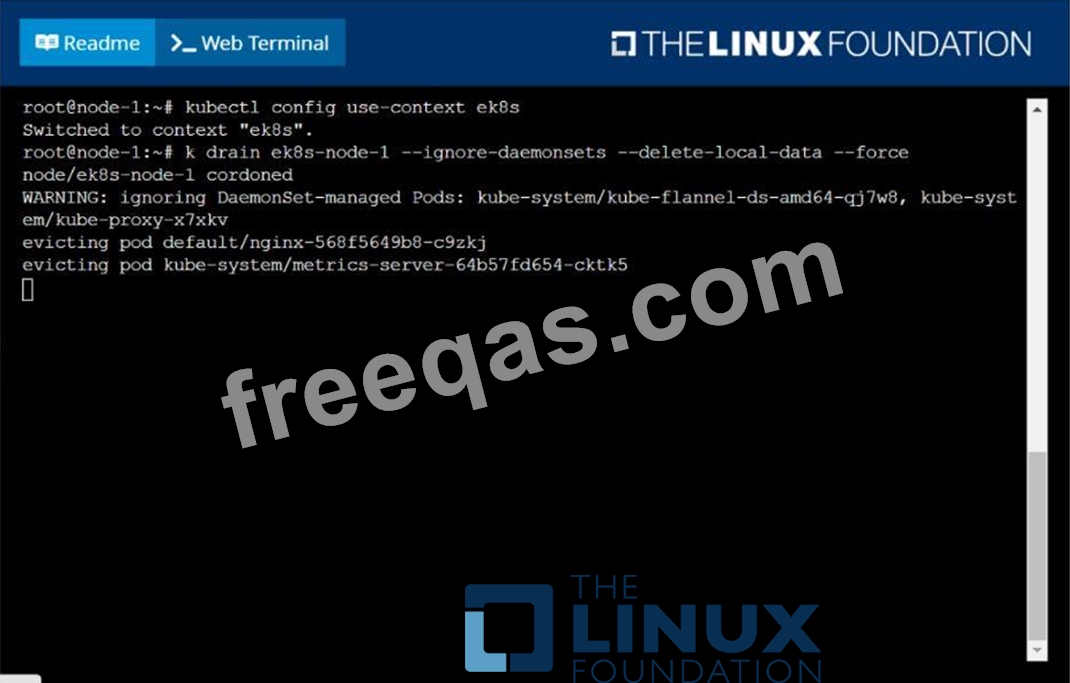
Set the node named ek8s-node-1 as unavailable and reschedule all the pods running on it.
Correct Answer:
insert code

Question 32

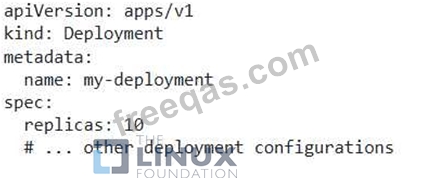
You have a Deployment with 5 replicas. You want to increase the number of replicas to 10, but only after ensuring that the new pods are healthy and ready to serve traffic.
Correct Answer:
See the solution below with Step by Step Explanation.
Explanation:
Solution (Step by Step) :
1. Update the Deployment YAML:
- Update the 'replicas' field in the Deployment YAML to 10.

2. Apply the Changes: - Apply the updated YAML file using 'kubectl apply -f my-deployment.yaml' 3. Monitor Pod Status: - Use 'kubectl get pods -l app=my-app' to monitor the status of the pods. - Ensure that the new pods are in the "Running' state and have a 'Ready' status. 4. Check Liveness and Readiness Probes: - If applicable, ensure that liveness and readiness probes are configured to check the health of the pods. - This helps in identifying and restarting unhealthy pods. 5. Verify Service Availability: - Use 'kubectl get services my-service" to check the service status. - Ensure that the service is still available and serving traffic. 6. Increase Replicas: - Once the new pods are healthy and ready, the deployment will automatically scale up to 10 replicas.
insert code

Question 33

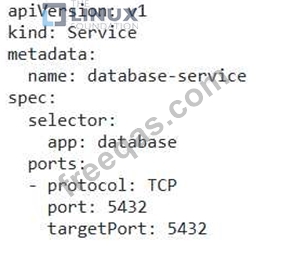
Your Kubernetes cluster is experiencing a high number of pod restarts in the 'database-service' Deployment. The logs show errors related to "connection refused" from the database service. You need to diagnose the issue and resolve it.
Correct Answer:
See the solution below with Step by Step Explanation.
Explanation:
Solution (Step by Step) :
1. Check the Database Service:
- Verify the database service is running and healthy:
- Use 'kubectl get services database-service' to check the service status.
- If the service is not running, try restarting it with 'kubectl delete service database-service' followed by 'kubectl apply -f database-service.yaml'
2. Investigate Network Connectivity:
- Check if pods in the 'database-service' Deployment can connect to the database service:
- Use 'kubectl exec -it -n bash' to enter a pod in the Deployment.
- Run 'ping database-service' or 'telnet database-service to test network connectivity.
- If ping or telnet fails, there might be a network issue between the pods and the database service.
3. Examine Service Configuration:
- Inspect the database service YAML:
- Verify the port mapping in the service definition matches the port that the database service listens on.
- Ensure the service selector matches the labels of the database pods.
- Example:

4. Check for Network Policies: - Determine if any network policies are blocking traffic between the database service and the pods: - Use 'kubectl get networkpolicies -n ' to list network policies. - Examine the policies to see if they are blocking traffic based on labels, ports, or other criteria. 5. Troubleshoot Database Service: - Verify the database service itself is running and accessible: - If you can access the database service directly from outside the cluster, but the pods cannot connect, there may be an issue with the database service itself. - Run tests to ensure the database is functioning correctly. 6. Test and Redeploy: - After making changes to the service definition, apply the update: - 'kubectl apply -f database-service.yaml' - Monitor the pod restarts. If the issue persists, consider further troubleshooting steps, such as inspecting firewall rules or DNS resolution.
insert code

Question 34

Score:7%

Task
Create a new PersistentVolumeClaim
* Name: pv-volume
* Class: csi-hostpath-sc
* Capacity: 10Mi
Create a new Pod which mounts the PersistentVolumeClaim as a volume:
* Name: web-server
* Image: nginx
* Mount path: /usr/share/nginx/html
Configure the new Pod to have ReadWriteOnce
Finally, using kubectl edit or kubectl patch PersistentVolumeClaim to a capacity of 70Mi and record that change.

Correct Answer:
See the solution below.
Explanation
Solution:
vi pvc.yaml
storageclass pvc
apiVersion: v1
kind: PersistentVolumeClaim
metadata:
name: pv-volume
spec:
accessModes:
- ReadWriteOnce
volumeMode: Filesystem
resources:
requests:
storage: 10Mi
storageClassName: csi-hostpath-sc
# vi pod-pvc.yaml
apiVersion: v1
kind: Pod
metadata:
name: web-server
spec:
containers:
- name: web-server
image: nginx
volumeMounts:
- mountPath: "/usr/share/nginx/html"
name: my-volume
volumes:
- name: my-volume
persistentVolumeClaim:
claimName: pv-volume
# craete
kubectl create -f pod-pvc.yaml
#edit
kubectl edit pvc pv-volume --record
insert code

Question 35

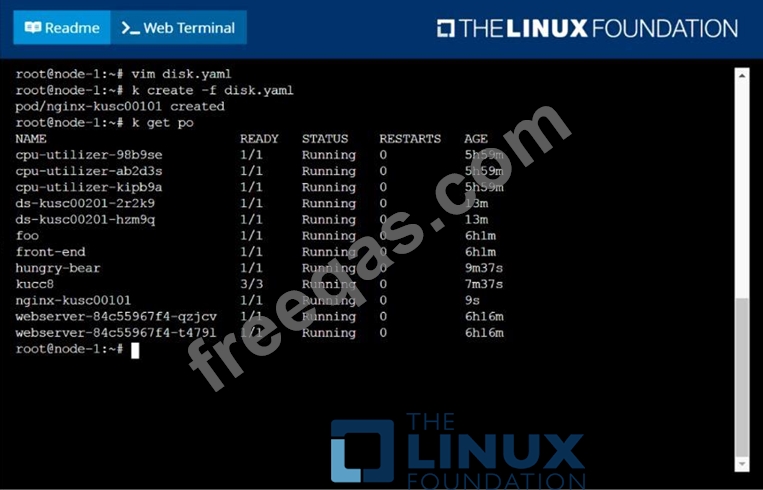
Schedule a pod as follows:
Name: nginx-kusc00101
Image: nginx
Node selector: disk=ssd

Correct Answer:
solution


insert code
  • ««
  • «
  • …
  • 3
  • 4
  • 5
  • 6
  • 7
  • 8
  • 9
  • 10
  • 11
  • 12
  • …
  • »
  • »»
[×]

Download PDF File

Enter your email address to download LinuxFoundation.CKA.v2026-10-12.q90 Dumps

Email:

FreeQAs

Our website provides the Largest and the most Latest vendors Certification Exam materials around the world.

Using dumps we provide to Pass the Exam, we has the Valid Dumps with passing guranteed just which you need.

  • DMCA
  • About
  • Contact Us
  • Privacy Policy
  • Terms & Conditions
©2026 FreeQAs

www.freeqas.com materials do not contain actual questions and answers from Cisco's certification exams.