FreeQAs
 Request Exam  Contact
  • Home
  • View All Exams
  • New QA's
  • Upload
PRACTICE EXAMS:
  • Oracle
  • Fortinet
  • Juniper
  • Microsoft
  • Cisco
  • Citrix
  • CompTIA
  • VMware
  • ISC
  • SAP
  • EMC
  • PMI
  • HP
  • Salesforce
  • Other
  • Oracle
    Oracle
  • Fortinet
    Fortinet
  • Juniper
    Juniper
  • Microsoft
    Microsoft
  • Cisco
    Cisco
  • Citrix
    Citrix
  • CompTIA
    CompTIA
  • VMware
    VMware
  • ISC
    ISC
  • SAP
    SAP
  • EMC
    EMC
  • PMI
    PMI
  • HP
    HP
  • Salesforce
    Salesforce
  1. Home
  2. Linux Foundation Certification
  3. CKA Exam
  4. LinuxFoundation.CKA.v2026-10-12.q90 Dumps
  • «
  • 1
  • 2
  • 3
  • 4
  • 5
  • 6
  • 7
  • 8
  • 9
  • 10
  • …
  • »
  • »»
Download Now

Question 11

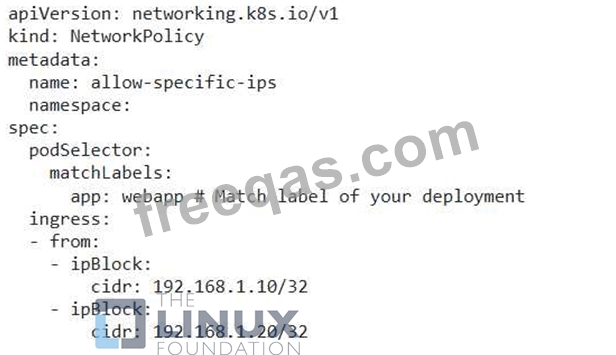
You have a Deployment running a web application with three replicas. The application is exposed using a 'NodePort' service. You need to configure the service so that it allows traffic only from specific IP addresses (e.g., 192.168.1.10, 192.168.1.20).
Correct Answer:
See the solution below with Step by Step Explanation.
Explanation:
Solution (Step by Step) :
1. Create a NetworkPolicy:
- Define a NetworkPolicy resource that allows traffic from the specified IP addresses to the Deployment pods.

2. Apply the NetworkPolicy: - Apply the YAML file using 'kubectl apply -f networkpolicy.yaml'. 3. Verify the NetworkPolicy: - Check the status of the NetworkPolicy using 'kubectl get networkpolicies allow-specific-ips -n 4. Test the Access: - Attempt to access the web application from the allowed IP addresses. You should be able to access it. - Try to access the application from other IP addresses. You should not be able to access it. Note: Replace " with the actual namespace where your Deployment and NetworkPolicy are located.
insert code

Question 12

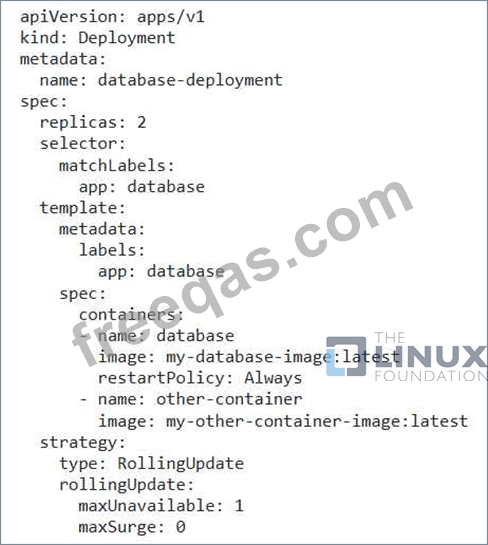
You have a Deployment named 'database-deployment' with 2 replicas of a database container. You want to implement a rolling update strategy that allows for a maximum of one pod to be unavailable at any given time. However, you also want to ensure that the database container is restarted automatically when it encounters a failure or crashes. This restart policy should be applied only to the database containers within the deployment and not affect any other containers in the same pod.
Correct Answer:
See the solution below with Step by Step Explanation.
Explanation:
Solution (Step by Step) :
1. Update the Deployment YAML:
- Update the 'replicas' to 2.
- Define 'maxUnavailable: 1' and 'maxSurge: 0' in the strategy.rollingUpdate' section to control the rolling update process.
- Configure a 'strategy.type' to 'RollingUpdate' to trigger a rolling update when the deployment is updated.
- Set 'spec.template.spec.containers[0].restartPolicy: Always' to ensure the database container restarts automatically when it encounters a failure.

2. Create the Deployment: - Apply the updated YAML file using 'kubectl apply -f database-deployment.yaml' 3. Verify the Deployment: - Check the status of the deployment using 'kubectl get deployments database-deployment' to confirm the rollout and updated replica count. 4. Test the Restart Policy: - Trigger a failure in the 'database' container within one of the pods. This can be done by sending a SIGKILL signal to the container or by simulating a crash within the container itself. - Observe that the 'database' container will be restarted automatically while other containers in the same pod will remain unaffected. 5. Trigger the Automatic Update: - Push a new image to the 'my-database-image:latest registry. 6. Monitor the Deployment: - Use "kubectl get pods -l app=database' to monitor the pod updates during the rolling update process. 7. Check for Successful Update: - Once the deployment is complete, use 'kubectl describe deployment database-deployment' to see that the 'updatedReplicas' field matches the 'replicas' field, indicating a successful update.
insert code

Question 13

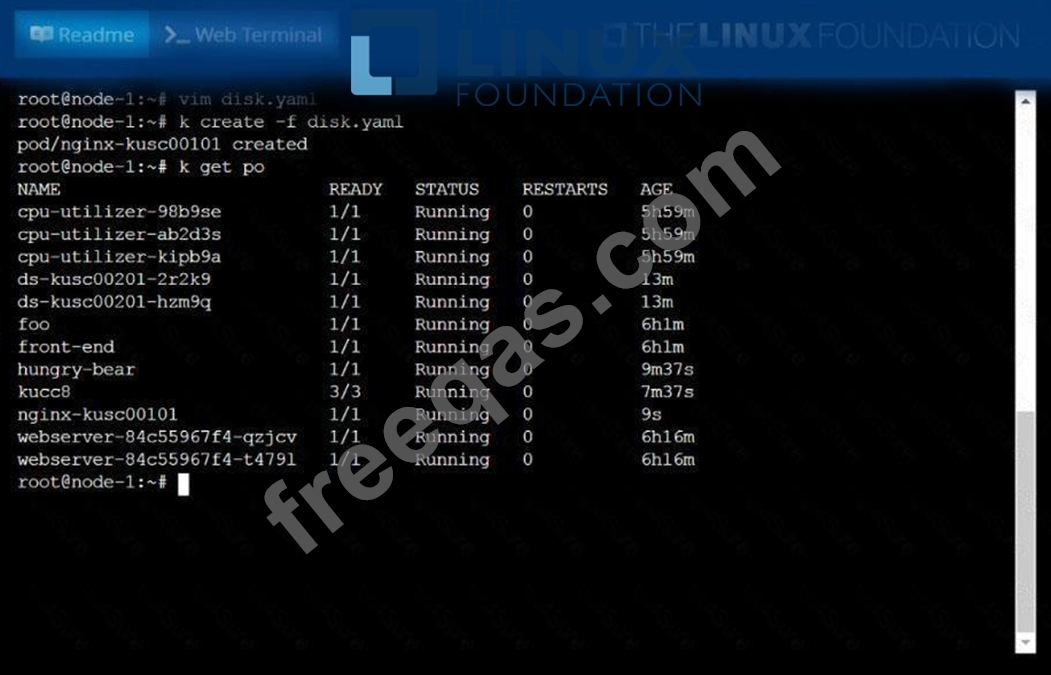
Schedule a pod as follows:
* Name: nginx-kusc00101
* Image: nginx
* Node selector: disk=ssd

Correct Answer:
See the solution below.
Explanation
solution


insert code

Question 14

You have a two-tier application with a frontend service 'frontend-svc' exposing a Node.js application running in pods labeled 'app: frontend', and a backend service 'backend-svc' exposing a Python application running in pods labeled 'app: backend'. The frontend pods need to communicate with the backend pods through a service. Design a Kubernetes network setup that allows the frontend pods to access the backend service, ensuring that the backend service is reachable only by the frontend service and not directly from outside the cluster.

Correct Answer:
See the solution below with Step by Step Explanation.
Explanation:
Solution (Step by Step) :
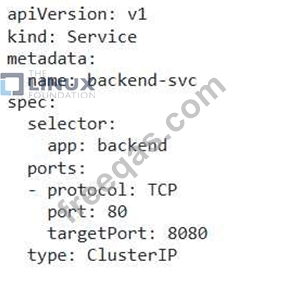
1. Create a Service for the Backend:
- Define a Service for the backend pods:

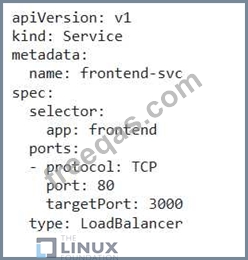
- This Service creates a ClusterlP service, accessible only within the cluster. The 'targetPort' specifies the port exposed by the backend pods. 2. Create a Service for the Frontend: - Define a Service for the frontend pods:

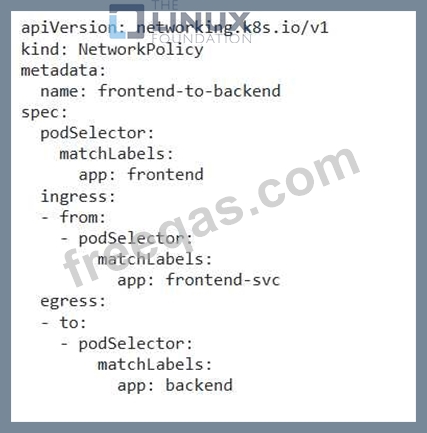
- This Service creates a LoadBalancer service, accessible from outside the cluster. 3. Configure NetworkPolicy for the Frontend Service: - Define a NetworkPolicy that allows traffic from the 'frontend-svc' to the 'backend-svc':

- This NetworkPolicy allows ingress traffic from the 'frontend-svc' and egress traffic to the 'backend-svc'. 4. Apply the Configurations: - Apply the YAML files using 'kubectl apply -f backend-svc.yaml' , 'kubectl apply -f frontend-svc.yamr , and kubectl apply -f frontend-to-backend.yamr. 5. Verification: - Check the status of the services: 'kubectl get services' - Check the network policy status: 'kubectl get networkpolicies' Now, the frontend pods can communicate with the backend service through the 'backend-svc' service. External clients can access the frontend application through the 'frontend-svc' service. The backend service is not accessible directly from outside the cluster due to the NetworkPolicy restricting traffic from external sources. ]
insert code

Question 15

Score: 4%

Task
Schedule a pod as follows:
* Name: nginx-kusc00401
* Image: nginx
* Node selector: disk=ssd

Correct Answer:
See the solution below.
Explanation
Solution:
#yaml
apiVersion: v1
kind: Pod
metadata:
name: nginx-kusc00401
spec:
containers:
- name: nginx
image: nginx
imagePullPolicy: IfNotPresent
nodeSelector:
disk: spinning
#
kubectl create -f node-select.yaml
insert code
  • «
  • 1
  • 2
  • 3
  • 4
  • 5
  • 6
  • 7
  • 8
  • 9
  • 10
  • …
  • »
  • »»
[×]

Download PDF File

Enter your email address to download LinuxFoundation.CKA.v2026-10-12.q90 Dumps

Email:

FreeQAs

Our website provides the Largest and the most Latest vendors Certification Exam materials around the world.

Using dumps we provide to Pass the Exam, we has the Valid Dumps with passing guranteed just which you need.

  • DMCA
  • About
  • Contact Us
  • Privacy Policy
  • Terms & Conditions
©2026 FreeQAs

www.freeqas.com materials do not contain actual questions and answers from Cisco's certification exams.