FreeQAs
 Request Exam  Contact
  • Home
  • View All Exams
  • New QA's
  • Upload
PRACTICE EXAMS:
  • Oracle
  • Fortinet
  • Juniper
  • Microsoft
  • Cisco
  • Citrix
  • CompTIA
  • VMware
  • ISC
  • SAP
  • EMC
  • PMI
  • HP
  • Salesforce
  • Other
  • Oracle
    Oracle
  • Fortinet
    Fortinet
  • Juniper
    Juniper
  • Microsoft
    Microsoft
  • Cisco
    Cisco
  • Citrix
    Citrix
  • CompTIA
    CompTIA
  • VMware
    VMware
  • ISC
    ISC
  • SAP
    SAP
  • EMC
    EMC
  • PMI
    PMI
  • HP
    HP
  • Salesforce
    Salesforce
  1. Home
  2. Linux Foundation Certification
  3. CKA Exam
  4. LinuxFoundation.CKA.v2026-10-12.q90 Dumps
  • «
  • 1
  • 2
  • 3
  • 4
  • 5
  • 6
  • 7
  • 8
  • 9
  • 10
  • …
  • »
  • »»
Download Now

Question 21

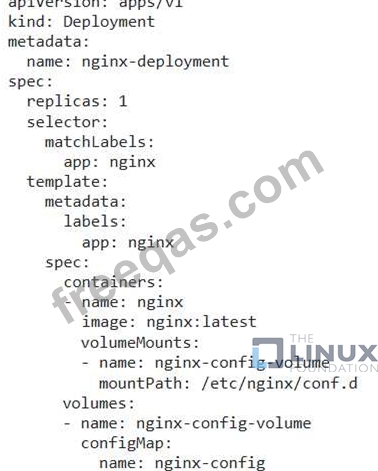
You have a Deployment named 'nginx-deployment running an Nginx server. The Nginx configuration file is stored in a ConfigMap named 'nginx-config'. You need to dynamically update the Nginx configuration file without restarting the Nginx pods.
Correct Answer:
See the solution below with Step by Step Explanation.
Explanation:
Solution (Step by Step) :
1 . Create the ConfigMap (if not already existing):
- Define a ConfigMap named 'nginx-config' containing the Nginx configuration file. For example, create a file 'nginx.conf with the desired configuration and then create the ConfigMap using 'kubectl create configmap nginx-config --from-file=nginx.conf:
kubectl create configmap nginx-config --from-file=nginx.conf
2. Configure Nginx Deployment:
- Modify the 'nginx-deployment' Deployment to mount the 'nginx-config' ConfigMap as a volume.
- Use 'volumeMounts' to specify where the ConfigMap should be mounted (e.g., '/etc/nginx/conf.d/' ) and 'volumes' to define the ConfigMap as a volume source.
- Update the Nginx container's configuration to use the mounted configuration file (e.g., 'nginx -g daemon off;').

3. Update the ConfigMap: - Modify the 'nginx-config' ConfigMap with the new configuration content. This can be done using 'kubectl patch' or 'kubectl edit': kubectl patch configmap nginx-config -p '{"data": {"nginx.conf": "new_nginx_configuration"}}' 4. Observe Nginx Pods: - Monitor the Nginx pods in the 'nginx-deployment' Deployment. Since the ConfigMap is mounted as a volume, Nginx will automatically reload the configuration file without restarting the pod. 5. Verify the Update: - Use 'kubectl logs' or 'kubectl exec' to examine the Nginx pod's logs and confirm that the new configuration is being used.
insert code

Question 22

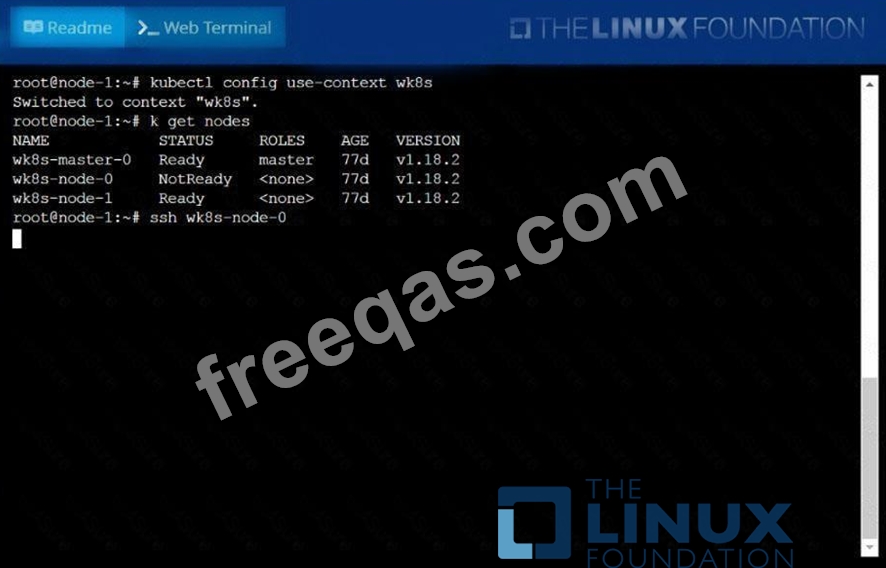
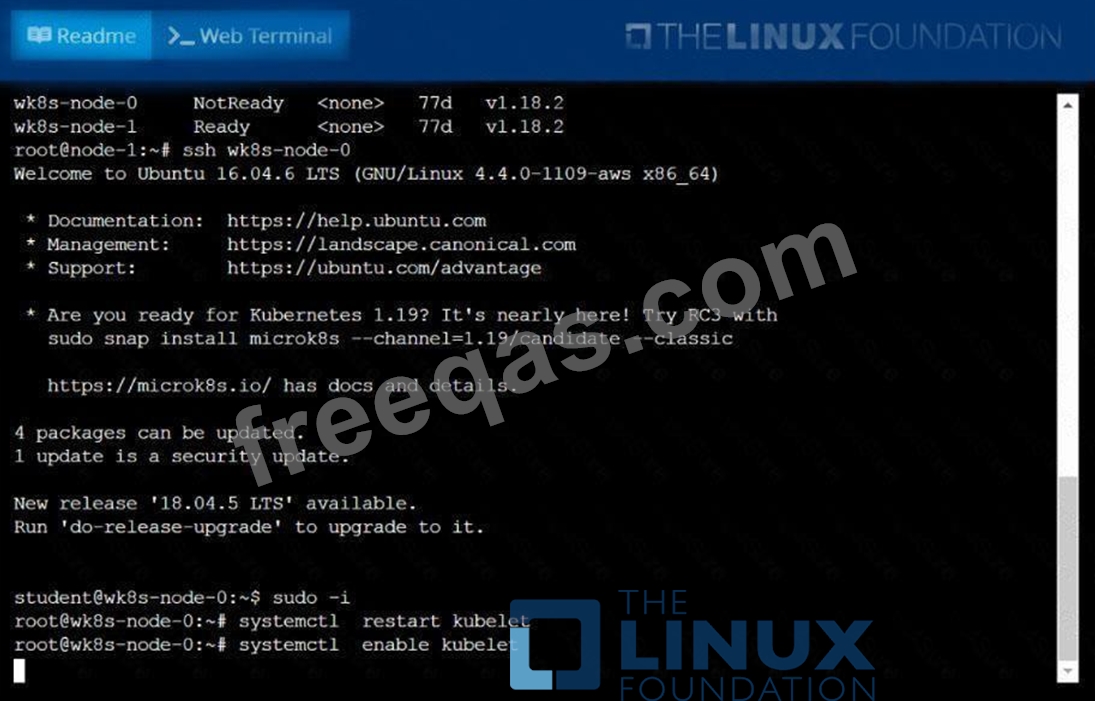
A Kubernetes worker node, named wk8s-node-0 is in state NotReady. Investigate why this is the case, and perform any appropriate steps to bring the node to a Ready state, ensuring that any changes are made permanent.
You can ssh to the failed node using:
[student@node-1] $ | ssh Wk8s-node-0
You can assume elevated privileges on the node with the following command:
[student@w8ks-node-0] $ | sudo -i
Correct Answer:
See the solution below.
Explanation
solution


insert code

Question 23

A bootstrap USB flash drive has been prepared using a Linux workstation to load the initial configuration of a Palo Alto Networks firewall. The USB flash drive was formatted using file system ntfs and the initial configuration is stored in a file named init-cfg.txt.
The contents of Init-cfg.txt in the USB flash drive are as follows:
type=static
ip-address=10.5.107.19
default-gateway=10.5.107.1
netmask=255.255.255.0
Ipv6-address=2001:400:100::1/64
ipv6-default-gateway=2001:400:100::2
hostname=Ca-FW-DC1
panorama-server=10.5.107.20
panorama-server-2=10.5.107.21
tplname=FINANCE TG4
dgname=finance_dg
dns-primary=10.5.6.6
op-command-modes multi-vsys.jumbo-frame
dhcp-send-hostname=no
dhcp-send-client-id=no
dhcp-accept-server-hostname=no
dhcp-accept-server-domain=no
The USB flash drive has been inserted in the firewalls' USB port, and the firewall has been powered on.Upon boot, the firewall fails to begin the bootstrapping process. The failure is caused because:

Correct Answer: B
insert code

Question 24

Create a busybox pod that runs the command "env" and save the output to "envpod" file

Correct Answer:
kubectl run busybox --image=busybox --restart=Never --rm -it -- env > envpod.yaml
insert code

Question 25

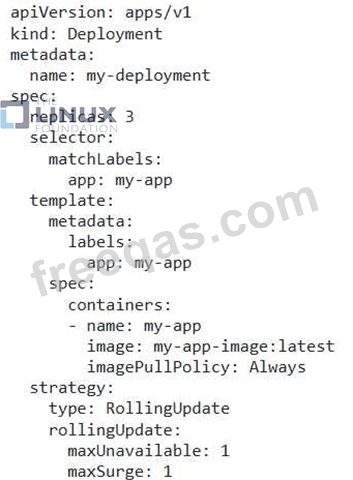
You are running an application in Kubernetes using a Deployment that defines 3 replicas. You need to perform a rolling update to the Deployment to upgrade the application to a new version. During the update process, you want to ensure that at least 2 replicas are always available, and the maximum number of new pods that can be created at the same time is also limited to 1. How can you configure the Deployment to achieve this rolling update strategy?
Correct Answer:
See the solution below with Step by Step Explanation.
Explanation:
Solution (Step by Step) :
1. Update Deployment YAML:
- Update the 'spec.replicas' field to the desired number of replicas for the new version.
- In the 'spec.strategy.rollingUpdate' section, set the 'maxUnavailable' to 1, meaning that only one pod can be unavailable during the update process.
- Set the maxSurge' to 1, limiting the number of new pods that can be created simultaneously to 1.

2. Apply the Updated Deployment: - Use 'kubectl apply -f deployment.yaml' to apply the changes to your cluster. 3. Monitor the Update Process: - Use 'kubectl get pods -l app=my-app' to monitor the pods. You will see a rolling update in progress: - One old pod will be terminated at a time. - One new pod will be created at a time. - The update will continue until all replicas are updated to the new version. 4. Verify the Update: - Once the update is complete, use 'kubectl describe deployment my-deployment' to check the deployment status. The 'updatedReplicas' field should match the 'replicas' field, indicating that the update was successful. By using 'maxUnavailable' and 'maxSurge' you control the number of unavailable and surge pods during the update process. This ensures a safe and controlled rolling update strategy.,
insert code
  • «
  • 1
  • 2
  • 3
  • 4
  • 5
  • 6
  • 7
  • 8
  • 9
  • 10
  • …
  • »
  • »»
[×]

Download PDF File

Enter your email address to download LinuxFoundation.CKA.v2026-10-12.q90 Dumps

Email:

FreeQAs

Our website provides the Largest and the most Latest vendors Certification Exam materials around the world.

Using dumps we provide to Pass the Exam, we has the Valid Dumps with passing guranteed just which you need.

  • DMCA
  • About
  • Contact Us
  • Privacy Policy
  • Terms & Conditions
©2026 FreeQAs

www.freeqas.com materials do not contain actual questions and answers from Cisco's certification exams.