FreeQAs
 Request Exam  Contact
  • Home
  • View All Exams
  • New QA's
  • Upload
PRACTICE EXAMS:
  • Oracle
  • Fortinet
  • Juniper
  • Microsoft
  • Cisco
  • Citrix
  • CompTIA
  • VMware
  • ISC
  • SAP
  • EMC
  • PMI
  • HP
  • Salesforce
  • Other
  • Oracle
    Oracle
  • Fortinet
    Fortinet
  • Juniper
    Juniper
  • Microsoft
    Microsoft
  • Cisco
    Cisco
  • Citrix
    Citrix
  • CompTIA
    CompTIA
  • VMware
    VMware
  • ISC
    ISC
  • SAP
    SAP
  • EMC
    EMC
  • PMI
    PMI
  • HP
    HP
  • Salesforce
    Salesforce
  1. Home
  2. Linux Foundation Certification
  3. CKA Exam
  4. LinuxFoundation.CKA.v2026-10-12.q90 Dumps
  • ««
  • «
  • …
  • 2
  • 3
  • 4
  • 5
  • 6
  • 7
  • 8
  • 9
  • 10
  • 11
  • …
  • »
  • »»
Download Now

Question 26

You have a Deployment that runs a containerized web application. The web application depends on a specific database service running on a different node in the cluster. The web application should only be able to connect to the database service on port 5432 and not any other services running on the database node. How can you define a NetworkPolicy to achieve this?
Correct Answer:
See the solution below with Step by Step Explanation.
Explanation:
Solution (Step by Step) :
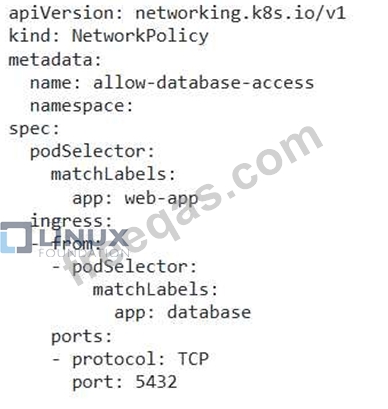
1. Network Policy Definition:

2. Explanation: - 'apiVersion: networking.k8s.io/v1 Specifies the API version for NetworkPolicy resources. - 'kind: NetworkPolicy': Specifies that this is a NetworkPolicy resource. - 'metadata.name: allow-database-access': Sets the name of the NetworkPolicy. - 'metadata.namespace: Specifies the namespace where the NetworkPolicy is applied. Replace with the actual namespace where your web application Deployment is running. - 'spec.podSelector.matchLabels: app: web-app': This selector targets Pods labeled with 'app: web-app', ensuring the NetworkPolicy applies to the web application Pods. - 'spec.ingress.from.podSelector.matchLabels: app: database': This allows incoming traffic only from Pods labeled with 'app: database'. - 'spec.ingress.ports.port: 5432': This allows communication only on port 5432. - 'spec.ingress.ports.protocol: TCP': Specifies the protocol (TCP) for the allowed port. 3. How it works: - This NetworkPolicy allows the web application Pods to connect only to the database service Pods on port 5432. It denies all other traffic from the database node, including other services that might be running on that node. 4. Implementation: - Apply the YAML using 'kubectl apply -f allow-database-access.yaml' 5. Verification: After applying the NetworkPolicy, test the connectivity from the web application Pods to the database service on port 5432 and to other services on the database node. You should observe that the NetworkPolicy effectively enforces the restrictions, allowing access only to the specified database port.
insert code

Question 27

Score: 4%

Task
Schedule a pod as follows:
* Name: nginx-kusc00401
* Image: nginx
* Node selector: disk=ssd

Correct Answer:
Solution:
#yaml
apiVersion: v1
kind: Pod
metadata:
name: nginx-kusc00401
spec:
containers:
- name: nginx
image: nginx
imagePullPolicy: IfNotPresent
nodeSelector:
disk: spinning
#
kubectl create -f node-select.yaml
insert code

Question 28

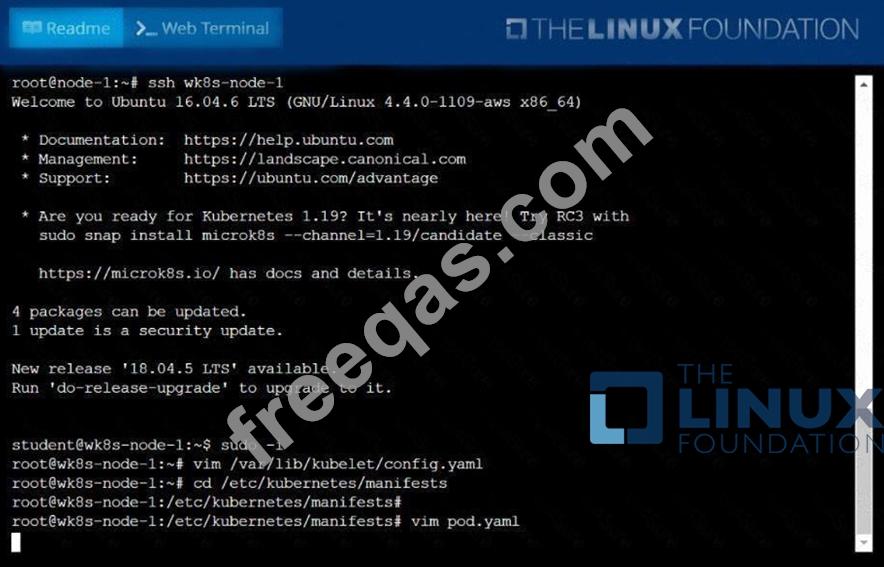
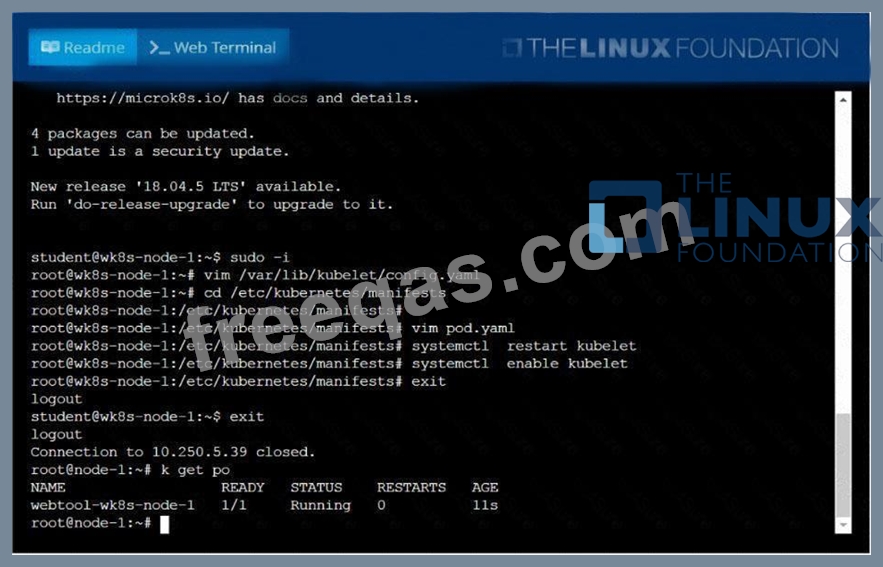
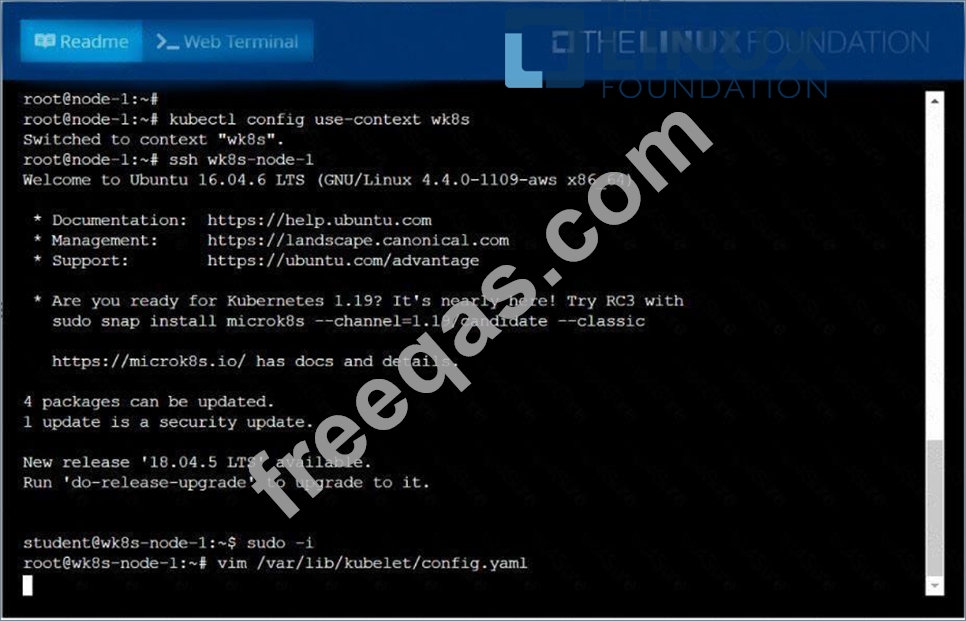
Configure the kubelet systemd- managed service, on the node labelled with name=wk8s-node-1, to launch a pod containing a single container of Image httpd named webtool automatically. Any spec files required should be placed in the /etc/kubernetes/manifests directory on the node.
You can ssh to the appropriate node using:
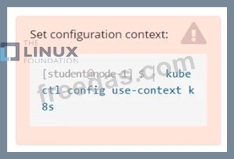
[student@node-1] $ ssh wk8s-node-1
You can assume elevated privileges on the node with the following command:
[student@wk8s-node-1] $ | sudo -i
Correct Answer:
See the solution below.
Explanation
solution


insert code

Question 29

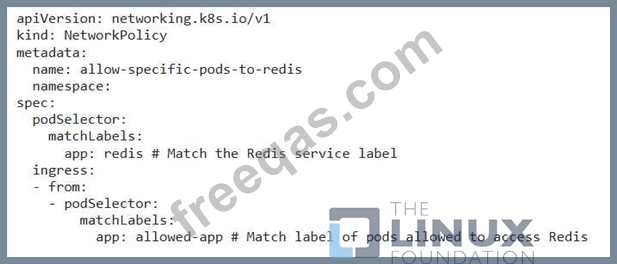
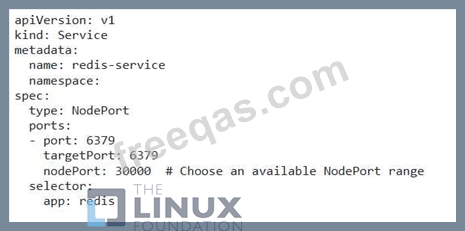
You have a deployment named 'redis-deployment' running a Redis server with 3 replicas. You need to configure a service with the 'NodePort' type to expose Redis on all nodes in the cluster, but restrict access only from specific pods within a namespace.
Correct Answer:
See the solution below with Step by Step Explanation.
Explanation:
Solution (Step by Step) :
1. Create a NetworkPolicy:
- Define a NetworkPolicy resource that allows traffic from specific pods in a namespace to the Redis service.

2. Create the NodePort service: - Create a NodePort service for the Redis deployment, allowing access to the Redis server through all nodes in the cluster.

3. Apply the resources: - Apply the NetworkPolicy and service using 'kubectl apply -f networkpolicy.yaml' and 'kubectl apply -f redis- service.yamP. 4. Verify: - Check the status of the NetworkPolicy and service: - 'kubectl get networkpolicies allow-specific-pods-to-redis -n - 'kubectl get services redis-service -n 5. Test: - From a pod labeled with 'app: allowed-app', try to connect to the Redis service using the NodePort on the node. - From a pod that doesn't have the 'allowed-app' label, attempt to connect to the Redis service using the NodePort. You should not be able to connect. Note: Replace with the actual namespace where your Redis deployment and the pods allowed to access it are located.
insert code

Question 30

List all service account and create a service account called "admin"

Correct Answer: A
insert code
  • ««
  • «
  • …
  • 2
  • 3
  • 4
  • 5
  • 6
  • 7
  • 8
  • 9
  • 10
  • 11
  • …
  • »
  • »»
[×]

Download PDF File

Enter your email address to download LinuxFoundation.CKA.v2026-10-12.q90 Dumps

Email:

FreeQAs

Our website provides the Largest and the most Latest vendors Certification Exam materials around the world.

Using dumps we provide to Pass the Exam, we has the Valid Dumps with passing guranteed just which you need.

  • DMCA
  • About
  • Contact Us
  • Privacy Policy
  • Terms & Conditions
©2026 FreeQAs

www.freeqas.com materials do not contain actual questions and answers from Cisco's certification exams.