FreeQAs
 Request Exam  Contact
  • Home
  • View All Exams
  • New QA's
  • Upload
PRACTICE EXAMS:
  • Oracle
  • Fortinet
  • Juniper
  • Microsoft
  • Cisco
  • Citrix
  • CompTIA
  • VMware
  • ISC
  • SAP
  • EMC
  • PMI
  • HP
  • Salesforce
  • Other
  • Oracle
    Oracle
  • Fortinet
    Fortinet
  • Juniper
    Juniper
  • Microsoft
    Microsoft
  • Cisco
    Cisco
  • Citrix
    Citrix
  • CompTIA
    CompTIA
  • VMware
    VMware
  • ISC
    ISC
  • SAP
    SAP
  • EMC
    EMC
  • PMI
    PMI
  • HP
    HP
  • Salesforce
    Salesforce
  1. Home
  2. Linux Foundation Certification
  3. CKA Exam
  4. LinuxFoundation.CKA.v2026-10-12.q90 Dumps
  • «
  • 1
  • 2
  • 3
  • 4
  • 5
  • 6
  • 7
  • 8
  • 9
  • 10
  • …
  • »
  • »»
Download Now

Question 16

Remove taint added to node "worker-2"

Correct Answer:
kubectl taint nodes worker-2 key:NoSchedule- // Verify You will see a message "node/worker-2 untainted" kubectl get nodes -o customcolumns=NAME:.metadata.name,TAINTS:.spec.taints --no-headers
insert code

Question 17

Create a busybox pod that runs the command "env" and save the output to "envpod" file See the solution below.

Correct Answer:
kubectl run busybox --image=busybox --restart=Never --rm -it -- env > envpod.yaml
insert code

Question 18

Task Weight: 4%

Task
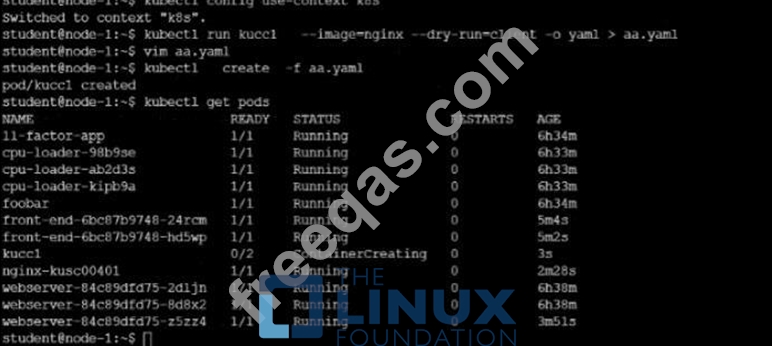
Schedule a Pod as follows:
* Name: kucc1
* App Containers: 2
* Container Name/Images:
o nginx
o consul

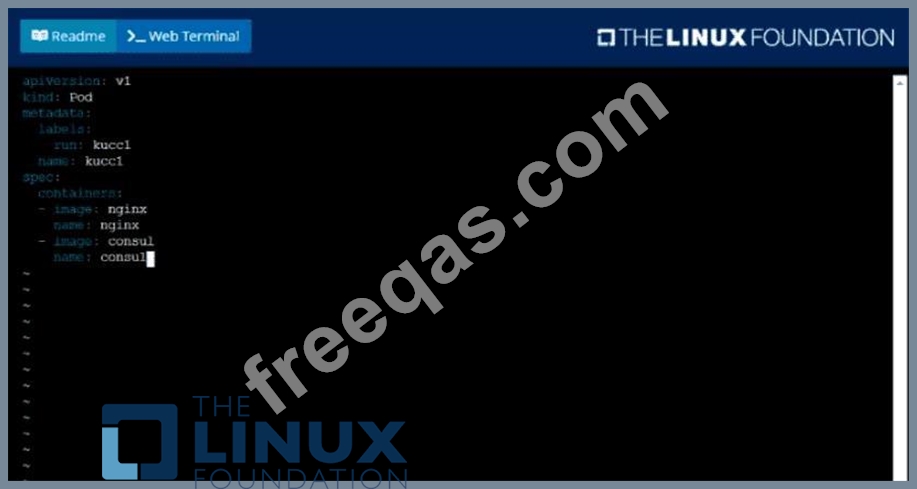
Correct Answer:
Solution:

Graphical user interface, text, application Description automatically generated

Text Description automatically generated
insert code

Question 19

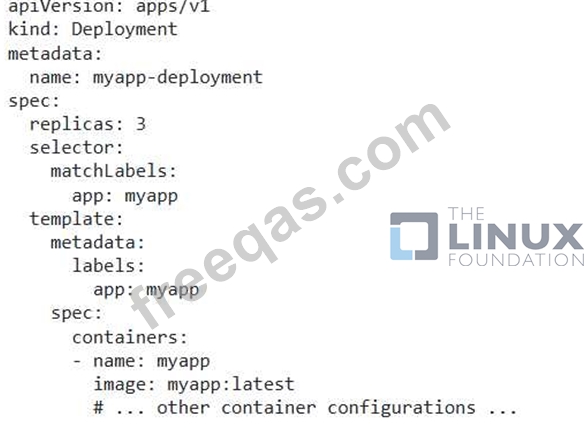
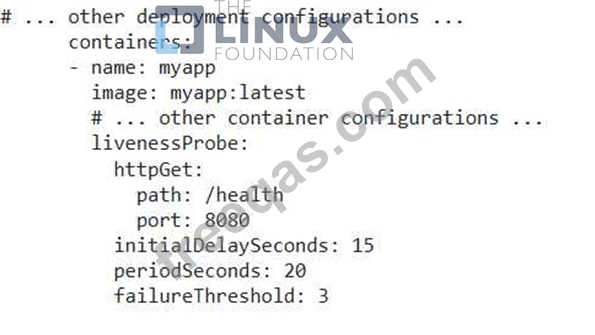
You are deploying an application on Kubernetes. You need to ensure that a minimum of three pods are always running for this application. How can you achieve this? Describe how to configure the deployment with a replica count and a liveness probe to monitor the health of the pods.
Correct Answer:
See the solution below with Step by Step Explanation.
Explanation:
Solution (Step by Step) :
1. Create a Deployment with a Replica Count:
- Create a YAML file named 'deployment.yamr with the following content:

- Apply the YAML file using 'kubectl apply -f deployment.yaml&. 2. Configure a Liveness Probe: - Update the 'deployment.yaml' file to include a liveness probe. For example, you could use a HTTP probe:

- Apply the updated YAML file using 'kubectl apply -f deployment.yaml'. 3. Verify the Deployment: - Check the status of the deployment using get deployments myapp-deploymen. - Ensure that three pods are running and that the liveness probe is monitoring their health. You can use 'kubectl describe pod myapp-deployment-XXXX' (where XXXX is the pod name) to see the details of the pod and the liveness probe status.
insert code

Question 20

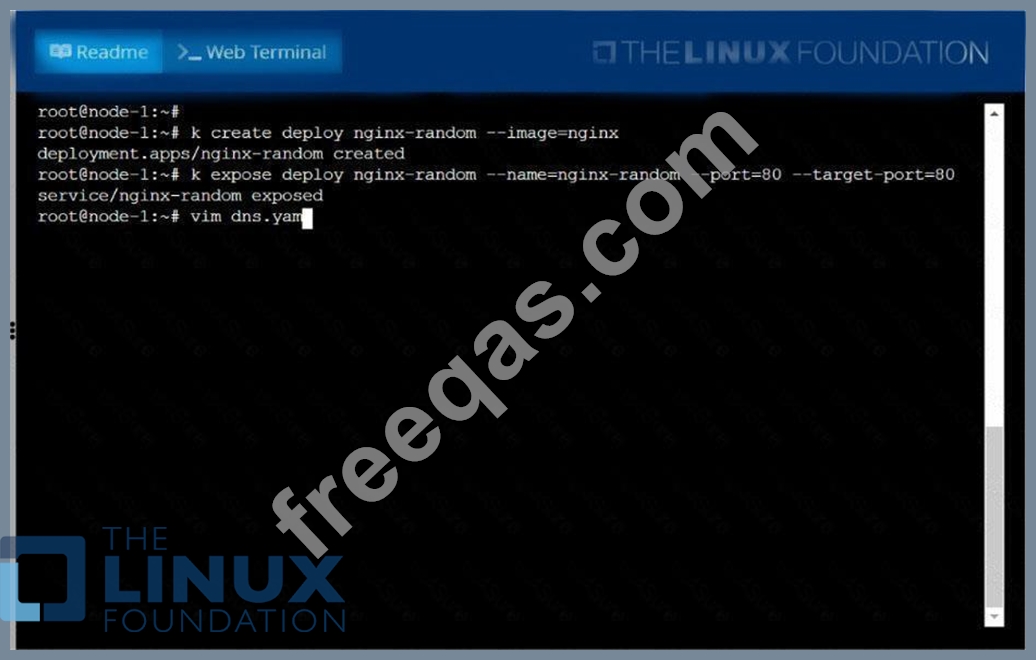
Create a deployment as follows:
* Name: nginx-random
* Exposed via a service nginx-random
* Ensure that the service & pod are accessible via their respective DNS records
* The container(s) within any pod(s) running as a part of this deployment should use the nginx Image Next, use the utility nslookup to look up the DNS records of the service & pod and write the output to
/opt/KUNW00601/service.dns and /opt/KUNW00601/pod.dns respectively.

Correct Answer:
See the solution below.
Explanation
Solution:


insert code
  • «
  • 1
  • 2
  • 3
  • 4
  • 5
  • 6
  • 7
  • 8
  • 9
  • 10
  • …
  • »
  • »»
[×]

Download PDF File

Enter your email address to download LinuxFoundation.CKA.v2026-10-12.q90 Dumps

Email:

FreeQAs

Our website provides the Largest and the most Latest vendors Certification Exam materials around the world.

Using dumps we provide to Pass the Exam, we has the Valid Dumps with passing guranteed just which you need.

  • DMCA
  • About
  • Contact Us
  • Privacy Policy
  • Terms & Conditions
©2026 FreeQAs

www.freeqas.com materials do not contain actual questions and answers from Cisco's certification exams.