FreeQAs
 Request Exam  Contact
  • Home
  • View All Exams
  • New QA's
  • Upload
PRACTICE EXAMS:
  • Oracle
  • Fortinet
  • Juniper
  • Microsoft
  • Cisco
  • Citrix
  • CompTIA
  • VMware
  • ISC
  • SAP
  • EMC
  • PMI
  • HP
  • Salesforce
  • Other
  • Oracle
    Oracle
  • Fortinet
    Fortinet
  • Juniper
    Juniper
  • Microsoft
    Microsoft
  • Cisco
    Cisco
  • Citrix
    Citrix
  • CompTIA
    CompTIA
  • VMware
    VMware
  • ISC
    ISC
  • SAP
    SAP
  • EMC
    EMC
  • PMI
    PMI
  • HP
    HP
  • Salesforce
    Salesforce
  1. Home
  2. Microsoft Certification
  3. AI-200 Exam
  4. Microsoft.AI-200.v2026-11-23.q122 Dumps
  • «
  • 1
  • 2
  • 3
  • 4
  • 5
  • 6
  • 7
  • 8
  • 9
  • 10
  • …
  • »
  • »»
Download Now

Question 1

Hotspot Question
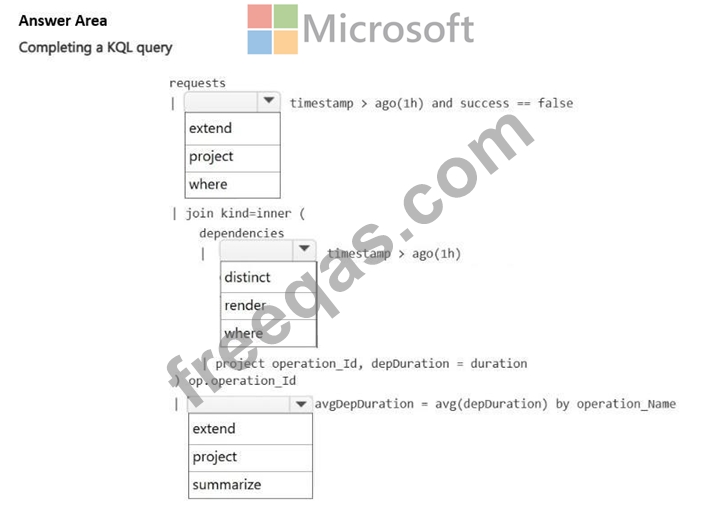
A company uses Azure Monitor Application Insights to monitor application behavior, including incoming requests and dependencies.
You must identify failed requests from the last hour. You must also calculate the average duration of failed request dependency calls, grouped by operation name.
You need to analyze telemetry in Application Insights.
Which operators should you use? To answer, select the appropriate options in the answer area.
NOTE: Each correct selection is worth one point.
Correct Answer:

Explanation:
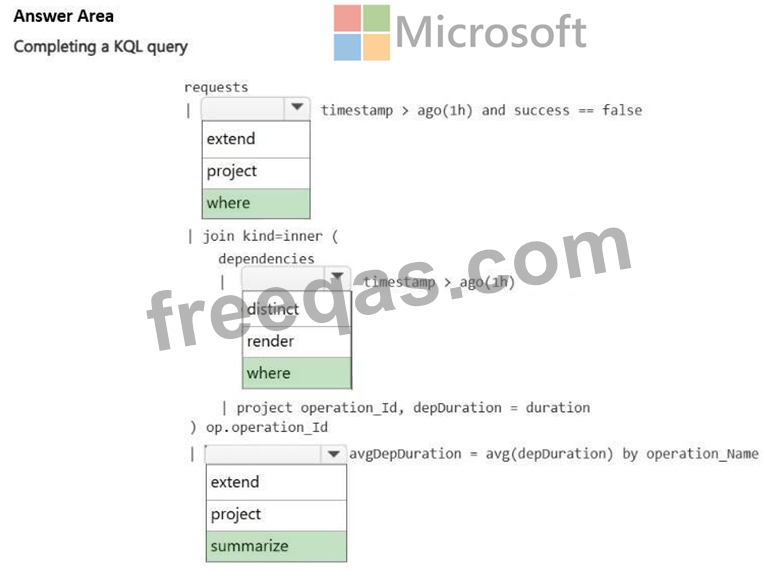
Box 1: where
Filter telemetry rows
The where operator filters a table to rows that satisfy a specific predicate. Both box 1 and box 2 require filtering telemetry data to the last hour (timestamp > ago(1h)).
Box 2: where
In the Kusto Query Language (KQL), the where operator filters a table to rows that satisfy a specific predicate or condition. Inside the inner subquery, you need to filter the dependencies telemetry table to only include records from the last hour (timestamp > ago(1)) Box 3: summarize Aggregate calculated data The summarize operator produces a table that aggregates the content of the input table. It is used here with the avg() aggregation function to calculate the average duration grouped by the operation_Name.
Reference:
https://tryhackme.com/room/kqlkustobasicqueries
insert code

Question 2

Drag and Drop Question
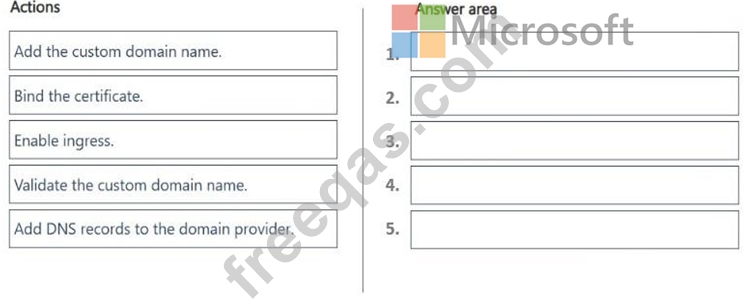
You are developing several microservices to run on Azure Container Apps.
The microservices must allow HTTPS access by using a custom domain.
You need to configure the custom domain in Azure Container Apps.
In which order should you perform the actions? To answer, move all actions from the list of actions to the answer area and arrange them in the correct order.
Correct Answer:

Explanation:
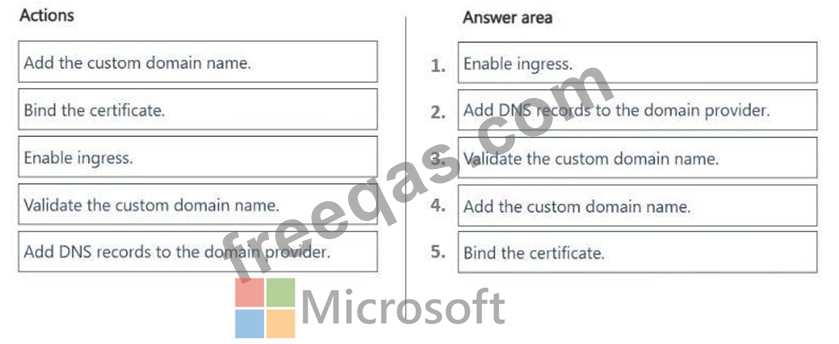
Step 1: Enable ingress
You must first expose your container app to external traffic to generate the default fully qualified domain name (FQDN) needed for DNS mapping.
Step 2: Add DNS records to the domain provider
Log into your domain registrar to create the required TXT (for verification) and CNAME/A records pointing to your container app.
Step 3: Validate the custom domain name
Azure checks your DNS records to confirm that you actually own the domain before allowing it to be linked.
Step 4: Add the custom domain name
Once validation passes, you officially add and register the custom domain name within the Azure Container App configuration.
Step 5: Bind the certificate
Finally, bind an SSL/TLS certificate to the custom domain to secure the connection and enable HTTPS access.
Reference:
https://learn.microsoft.com/en-us/azure/container-apps/ingress-overview
insert code

Question 3

You are implementing semantic retrieval for a chatbot.
Embeddings are already stored in Redis. However, vector similarity queries do not return matches.
You need to resolve the vector similarity search issue.
What should you do?

Correct Answer: C
Creating a FLAT vector index on your embedding field will resolve the issue and allow your Redis vector similarity queries to return matches.
In Redis (using the Redis Search and Query features), vector fields cannot be queried using Vector Similarity Search (VSS) syntax until a dedicated vector index is explicitly built over them.
No Automatic Indexing: Redis does not automatically index JSON or Hash fields containing raw binary or string embeddings.
Query Failure: Without an index, VSS queries (using the KNN operator) will fail with syntax errors or return zero results because the query engine cannot parse the unindexed field.
Reference:
https://www.louisbouchard.ai/indexing-methods/
insert code

Question 4

Drag and Drop Question
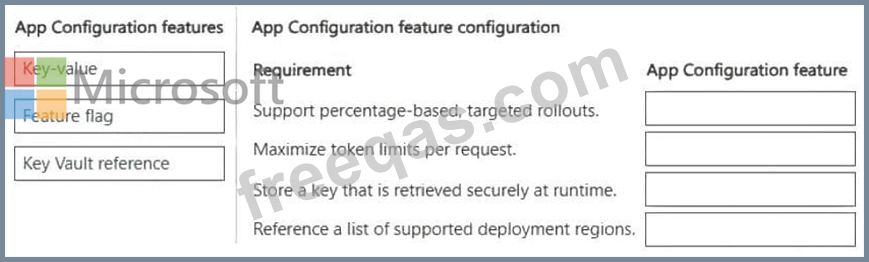
You are configuring an Azure-hosted AI application that uses Azure App Configuration to manage its runtime settings.
The application must provide the following functionality:
- Support percentage-based, targeted rollouts.
- Maximize token limits per request.
- Store a key that is retrieved securely at runtime.
- Reference a list of supported deployment regions.
You need to configure the App Configuration features for the app.
Which features should you configure? To answer, move the appropriate App Configuration features to the correct configuration items. You may use each App Configuration features once, more than once, or not at all. You may need to move the split bar between panes or scroll to view content.
NOTE: Each correct selection is worth one point.
Correct Answer:

Explanation:
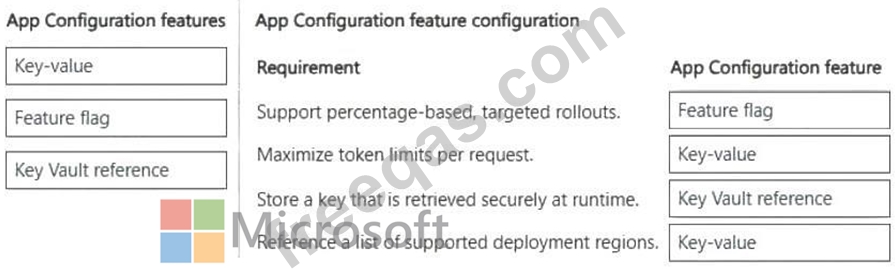
Box 1: Feature flag
Use a Feature flag.
Azure App Configuration provides built-in feature management specifically designed to dynamically control application behavior without redeploying code.
Percentage-Based Rollouts: Feature flags support targeting filters (such as the standard Microsoft.Targeting filter), which natively handle percentage-based rollouts and specific audience targeting rules.
Dynamic Changes: You can safely toggle features or change the exposure percentage on the fly directly through the Azure portal or via APIs.
Box 2: Key-value
Key-value is the correct feature to use.
A standard key-value pair is the optimal choice for managing runtime settings like numeric thresholds or token limits.
Direct Data Injection: It allows you to store the specific maximum token limit (e.g., MaxTokensPerRequest = 4096) as an integer or string that your application can parse directly at runtime.
No Extra Overhead: Unlike the other options, a standard key-value pair maps directly to application configuration variables without requiring secondary lookups or conditional logic evaluation.
Box 3: Key Vault reference
Use an Azure Key Vault reference.
Azure App Configuration is optimized for non-sensitive runtime configurations like feature flags, environment names, and general application settings. Sensitive values (such as API keys for OpenAI/LLM models, database passwords, and connection strings) should always be stored natively in Azure Key Vault.
By creating a Key Vault Reference inside Azure App Configuration, you store only the URI pointing to the secret rather than the secret value itself. When your AI application requests configuration data at runtime, the App Configuration provider automatically contacts Key Vault, resolves the reference, and securely injects the actual secret directly into your application's memory pipeline.
Box 4: Key-value
Use a standard configuration key-value pair (or a JSON array within a key).
How to store it: Save the regions as a comma-separated string or a JSON array under a single key.
Key Example: Deployment:SupportedRegionsValue Example: ["eastus", "westeurope",
"southeastasia"]
Content Type: Set the content type to application/json so your application can automatically parse it into a list or array at runtime.
Reference:
https://learn.microsoft.com/en-us/azure/azure-app-configuration/manage-feature-flags
https://turbo360.com/blog/get-azure-key-value-pairs-from-app-configuration
https://learn.microsoft.com/en-us/azure/app-service/app-service-key-vault-references
insert code

Question 5

Note: This question is part of a series of questions that present the same scenario. Each question in the series contains a unique solution that might meet the stated goals.
You are preparing a production deployment for an Azure Function app. The app will run across multiple environments.
The solution must support environment-specific configuration and prevent secrets from being stored in source control.
You need to develop the solution.
Solution: Store connection strings in the Function app application settings configured in the Azure Portal.
Does the solution meet the goal?


Correct Answer: A
Azure Functions application settings are the correct mechanism for keeping environment-specific configuration outside the application source code. Microsoft documents that application settings, including connection strings and other configuration values, are defined separately for each function app . This allows development, test, staging, and production deployments to use different values without modifying the application code.
At runtime, Function app settings are exposed to the application as environment variables , so code can retrieve the required connection string or configuration value without embedding it in a configuration file committed to source control. This directly satisfies the requirement to prevent secrets from being stored in the Git repository.
For production-grade secret management, Azure Key Vault references are often preferable because they provide centralized secret lifecycle management and can be combined with managed identities. However, the question asks only whether the proposed solution meets the stated goals. Storing connection strings in Azure Function application settings does satisfy both: values can vary by deployed environment and remain outside source-controlled application files.
Study Guide references: Azure Functions configuration; application settings; environment variables; secure application configuration.
insert code
  • «
  • 1
  • 2
  • 3
  • 4
  • 5
  • 6
  • 7
  • 8
  • 9
  • 10
  • …
  • »
  • »»
[×]

Download PDF File

Enter your email address to download Microsoft.AI-200.v2026-11-23.q122 Dumps

Email:

FreeQAs

Our website provides the Largest and the most Latest vendors Certification Exam materials around the world.

Using dumps we provide to Pass the Exam, we has the Valid Dumps with passing guranteed just which you need.

  • DMCA
  • About
  • Contact Us
  • Privacy Policy
  • Terms & Conditions
©2026 FreeQAs

www.freeqas.com materials do not contain actual questions and answers from Cisco's certification exams.