FreeQAs
 Request Exam  Contact
  • Home
  • View All Exams
  • New QA's
  • Upload
PRACTICE EXAMS:
  • Oracle
  • Fortinet
  • Juniper
  • Microsoft
  • Cisco
  • Citrix
  • CompTIA
  • VMware
  • ISC
  • SAP
  • EMC
  • PMI
  • HP
  • Salesforce
  • Other
  • Oracle
    Oracle
  • Fortinet
    Fortinet
  • Juniper
    Juniper
  • Microsoft
    Microsoft
  • Cisco
    Cisco
  • Citrix
    Citrix
  • CompTIA
    CompTIA
  • VMware
    VMware
  • ISC
    ISC
  • SAP
    SAP
  • EMC
    EMC
  • PMI
    PMI
  • HP
    HP
  • Salesforce
    Salesforce
  1. Home
  2. Microsoft Certification
  3. AI-200 Exam
  4. Microsoft.AI-200.v2026-11-23.q122 Dumps
  • «
  • 1
  • 2
  • 3
  • 4
  • 5
  • 6
  • 7
  • 8
  • 9
  • 10
  • …
  • »
  • »»
Download Now

Question 16

Note: This question is part of a series of questions that present the same scenario. Each question in the series contains a unique solution that might meet the stated goals. Some question sets might have more than one correct solution, while others might not have a correct solution.
After you answer a question in this section, you will NOT be able to return to it. As a result, these questions will not appear on the review screen.
You plan to deploy a container to an Azure App Service API app named api1. You host the source code for api1 in a GitHub repository. The container uses the API key at runtime to connect to a backend service.
The container must be able to retrieve the API key at runtime without exposing it in the source repository or Git commit history.
You need to ensure that the API key remains outside of Git commit history and is available to the container at runtime.
Solution: Store the API key as a GitHub repository secret.
Does the solution meet the goal?

Correct Answer: B
Correct:
* Store the API key in Azure Key Vault and reference it from an App Service application setting.
Storing the API key in Azure Key Vault and referencing it via App Service application settings is the recommended, secure approach. This strategy completely removes sensitive credentials from your GitHub repository and Git commit history while injecting them safely into your container environment at runtime.
Incorrect:
* Embed the API key as a hardcoded environment variable in the Dockerfile.
* Store the API key as a GitHub repository secret.
Reference:
https://www.qservicesit.com/full-stack-applications-on-azure
insert code

Question 17

Drag and Drop Question
You are developing a .NET application that uses Azure Cosmos DB for NoSQL to store application data.
The application uses the Azure Cosmos DB for NoSQL SDK to interact with the database account.
The application must perform the following tasks:
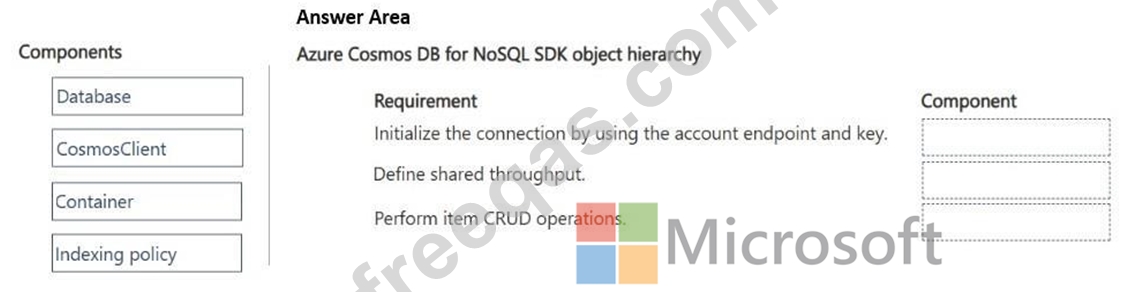
- Initialize the connection by using the account endpoint and key.
- Define shared throughput.
- Perform create, read, update, and delete (CRUD) operations on items
stored in a container.
You need to implement the SDK components required for the application to access and manage data in Azure Cosmos DB for NoSQL.
Which SDK components should you use? To answer, move the appropriate components to the correct requirements. You may use each component once, more than once, or not at all. You may need to move the split bar between panes or scroll to view content.
NOTE: Each correct selection is worth one point.
Correct Answer:

Explanation:
Box 1: CosmosClient
To initialize the connection to an Azure Cosmos DB for NoSQL account using the account endpoint and key, you must use the CosmosClient class.
Box 2: Database
The database SDK component should be used to define shared throughput.
In Azure Cosmos DB, shared throughput (provisioned Request Units per second or RU/s) is configured at the database level. When throughput is provisioned on a database, that capacity is shared among all the containers created within that specific database.
Box 3: Container
To perform item create, read, update, and delete (CRUD) operations, you should use the Container SDK component In the Azure Cosmos DB for NoSQL SDK for .NET, individual JSON documents (items) live inside a container. The Container class exposes the specific methods required to execute CRUD operations on these items.
Reference:
https://learn.microsoft.com/en-us/azure/cosmos-db/how-to-dotnet-get-started
insert code

Question 18

You are designing an Azure Function app that processes large image uploads submitted by users through an HTTP endpoint.
The solution must:
- Prevent client timeouts by decoupling image processing from the
initial upload request.
- Support automatic retry behavior for failed processing attempts.
- Scale the background processing independently of the rate of incoming HTTP uploads.
You need to design a scalable and reliable asynchronous processing solution.
Which two actions should you implement? Each correct answer presents part of the solution.
NOTE: Each correct selection is worth one point.

Correct Answer: A,C
To build a scalable and reliable asynchronous solution that meets the requirements, you should use an HTTP-triggered function to save images to Azure Blob Storage and enqueue a message, then use a Queue-triggered function to process the image.
1. Decouple via Queue Messaging
HTTP Function: Receives the initial user upload, saves the large image file directly to Azure Blob Storage, and writes a small metadata message (e.g., the blob URI) into an Azure Storage Queue or Azure Service Bus Queue.
Instant Response: The HTTP function immediately returns a 202 Accepted status to the client along with a status-tracking URL. This completely eliminates client timeout issues by shifting heavy work to the background.
2. Leverage Built-In Queue Triggers
Queue-Triggered Function: A second, separate Azure Function is configured to trigger whenever a new message lands in the queue. It downloads the image from Blob Storage and performs the processing.
Automatic Retries: Azure Queue storage and Service Bus triggers feature native retry behavior. If the processing function fails or crashes, the message is automatically returned to the queue to be retried. Persistent failures are automatically moved to a Poison Queue (Dead Letter Queue) after a configured number of attempts (default is 5).
Independent Scaling: Under the Azure Consumption or Premium plan, the Queue-triggered function scales its instances up or down based on the queue length (the backlog of images to process). This scales independently of the HTTP-triggered function, which scales purely based on incoming request volume.
Reference:
https://oneuptime.com/blog/post/2026-02-16-azure-functions-python-http-triggers-blob-storage/view
insert code

Question 19

Hotspot Question
You deploy a Linux container image to App Service.
The container requires the following environment variables at runtime:
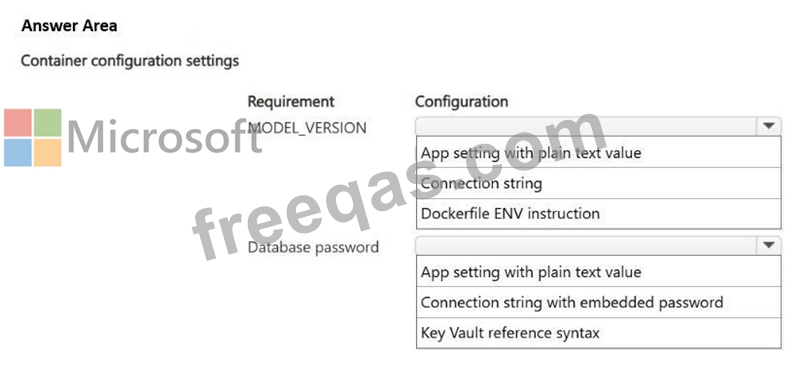
- A non-sensitive configuration value named MODEL_VERSION
- A database password that must remain secure
You need to configure App Service to provide these environment variables at runtime.
Which configurations should you use? To answer, select the appropriate options in the answer area.
NOTE: Each correct selection is worth one point.
Correct Answer:

Explanation:
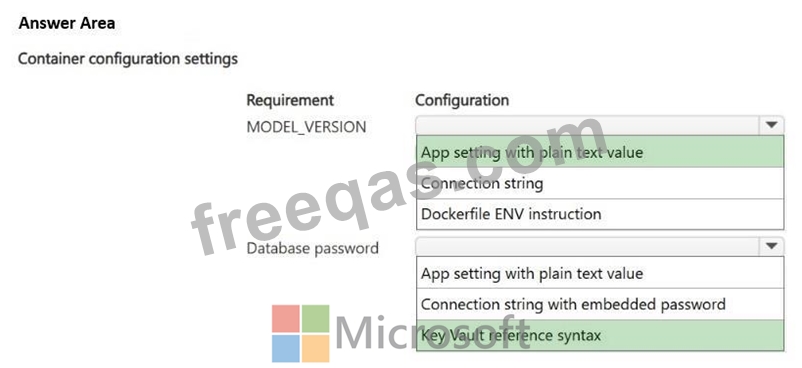
Box 1: App setting with plain text value
To provide a non-sensitive environment variable named MODEL_VERSION to a Linux custom container deployed to Azure App Service, you should configure it as an Application Setting (App Setting). In Azure App Service, any custom configuration defined within the Application Settings is automatically injected into Linux containers as an environment variable at runtime.
Box 2: Key Vault reference syntax
You should configure the database password as an Azure Key Vault reference inside App Service Application Settings. This prevents the secret from being stored in plaintext in the app configuration and injects it securely into the container as an environment variable at runtime.
Reference:
https://learn.microsoft.com/en-us/azure/app-service/tutorial-custom-container?tabs=azure-cli&pivots=container-linux
insert code

Question 20

You are provisioning and configuring a Service Bus processor for AI batch jobs.
The processor must connect to an existing queue, register handlers for message and error processing, and then begin receiving messages.
You need to provision and configure the Service Bus processor for message and error handling.
Which four actions should you perform in sequence? To answer, move the appropriate actions from the list of actions to the answer area and arrange them in the correct order.

Correct Answer:

Explanation:

Verified Answer: 1) Create the Service Bus client; 2) create the queue processor/receiver; 3) register message and error handlers; 4) start the message processor.
Detailed Explanation: The processor depends on a namespace client/connection, so the client is created first.
Next, the queue-specific processor or receiver is created from that client. Message and error callbacks must be registered before processing starts so incoming messages and failures have defined handlers. Starting the processor is therefore the final step. Dead-lettering failed messages is an optional application settlement decision and is not a prerequisite for constructing and starting the processor.
Study Guide Alignment: Azure service integration: Service Bus, Event Grid, Azure Functions triggers
/bindings, and event-driven processing.
Official Microsoft Learn References: AI-200 Study Guide | Service Bus message transfers, locks, and settlement
insert code
  • «
  • 1
  • 2
  • 3
  • 4
  • 5
  • 6
  • 7
  • 8
  • 9
  • 10
  • …
  • »
  • »»
[×]

Download PDF File

Enter your email address to download Microsoft.AI-200.v2026-11-23.q122 Dumps

Email:

FreeQAs

Our website provides the Largest and the most Latest vendors Certification Exam materials around the world.

Using dumps we provide to Pass the Exam, we has the Valid Dumps with passing guranteed just which you need.

  • DMCA
  • About
  • Contact Us
  • Privacy Policy
  • Terms & Conditions
©2026 FreeQAs

www.freeqas.com materials do not contain actual questions and answers from Cisco's certification exams.
