An administrator wants to incorporate a third-party security device to generate security events and alarms. The third-party device is configured to send syslog messages to FortiNAC-F. Which two items must be completed? (Choose two.)
Correct Answer: B,C
Question 32
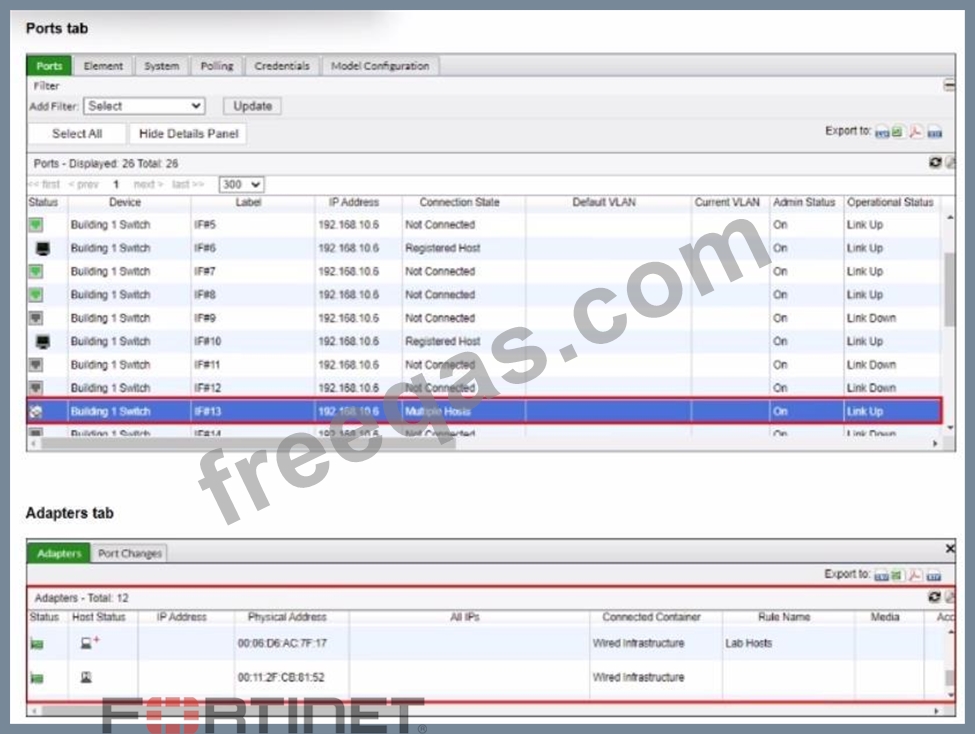
Refer to the exhibits. What would happen if the highlighted port with connected hosts was placed in both the Forced Registration and Forced Remediation port groups?
Correct Answer: D
In FortiNAC-F, Port Groups are used to apply specific enforcement behaviors to switch ports. When a port is assigned to an enforcement group, such as Forced Registration or Forced Remediation, FortiNAC-F overrides normal policy logic to force all connected adapters into that specific state. The exhibit shows a port (IF#13) with "Multiple Hosts" connected, which is a common scenario in environments using unmanaged switches or hubs downstream from a managed switch port. According to the FortiNAC-F Administrator Guide, it is possible for a single port to be a member of multiple port groups. However, when those groups have conflicting enforcement actions--such as one group forcing a registration state and another forcing a remediation state--FortiNAC-F utilizes a ranking system to resolve the conflict. In the FortiNAC-F GUI under Network > Port Management > Port Groups, each group is assigned a rank. The system evaluates these ranks, and only the higher ranked enforcement group is applied to the port. If a port is in both a Forced Registration group and a Forced Remediation group, the group with the numerical priority (rank) will dictate the VLAN and access level assigned to all hosts on that port. This mechanism ensures consistent behavior across the fabric. If the ranking determines that "Forced Registration" is higher priority, then even a known host that is failing a compliance scan (which would normally trigger Remediation) will be held in the Registration VLAN because the port-level enforcement takes precedence based on its rank. "A port can be a member of multiple groups. If more than one group has an enforcement assigned, the group with the highest rank (lowest numerical value) is used to determine the enforcement for the port. When a port is placed in a group with an enforcement, that enforcement is applied to all hosts connected to that port, regardless of the host's current state."
Question 33
When FortiNAC-F is managing VPN clients connecting through FortiGate, why must the clients run a FortiNAC-F agent?
Correct Answer: C
When FortiNAC-F manages VPN clients through a FortiGate, the agent plays a fundamental role in device identification that standard network protocols cannot provide on their own. In a standard VPN connection, the FortiGate establishes a Layer 3 tunnel and assigns a virtual IP address to the client. While the FortiGate sends a syslog message to FortiNAC-F containing the username and this assigned IP address, it typically does not provide the hardware (MAC) address of the remote endpoint's physical or virtual adapter. FortiNAC-F relies on the MAC address as the primary unique identifier for all host records in its database. Without the MAC address, FortiNAC-F cannot correlate the incoming VPN session with an existing host record to apply specific policies or track the device's history. By running either a Persistent or Dissolvable Agent, the endpoint retrieves its own MAC address and communicates it directly to the FortiNAC-F service interface. This allows the "IP to MAC" mapping to occur. Once FortiNAC-F has both the IP and the MAC, it can successfully identify the device, verify its status, and send the appropriate FSSO tags or group information back to the FortiGate to lift network restrictions.
Question 34
During an evaluation of state-based enforcement, an administrator discovers that ports that should not be under enforcement have been added to enforcement groups. In which view would the administrator be able to identify who added the ports to the groups? (Selected)
Correct Answer: A
In FortiNAC-F, accountability and forensic tracking of configuration changes are managed through theAdmin Auditingfunctionality. When an administrator performs an action that modifies the system state-such as creating a policy, changing a device ' s status, or adding a switch port to anEnforcement Group-the system generates an audit record. This record is essential for troubleshooting scenarios where unauthorized or accidental configuration changes have occurred, leading to unintended network behavior. TheAdmin Auditingview (found underLogs > Admin Auditing) provides a comprehensive log of the " Who, What, and When " for every administrative session. Each entry includes the username of the administrator, the source IP address from which they accessed the FortiNAC-F console, a precise timestamp, and a detailed description of the modification. In the scenario described, where ports have been incorrectly added to enforcement groups, the Admin Auditing view allows a supervisor to filter by the specific " Port " or " Group " object to identify exactly which administrator executed the command. In contrast, theEvent Managementview (B) is designed to monitor system and network events, such as RADIUS authentications, host connections, and SNMP trap arrivals. While it tracks system activity, it does not typically log the manual configuration changes performed by admins. ThePort Changesview (C) tracks the operational history of a port (such as VLAN assignment changes and host movements) but does not attribute the administrative assignment of the port to a group. Finally, theSecurity Eventsview (D) is dedicated to alerts triggered by security rules and external threat feeds. " Admin Auditing displays a record of all modifications made to the FortiNAC-F system by an administrator. This view includes the administrator ' s name, the date and time of the change, and a description of the action taken. It is the primary resource for determining which administrative user performed a specific configuration change, such as modifying port group memberships or altering policy settings. " -FortiNAC-F Administration Guide: Logging and Auditing Section.
Question 35
An administrator has created several device profiling rules and evaluated all existing devices in the database. Some of the devices appear in the profiled devices view because they matched a rule, but they remain unknown and the registration column in the profiled devices view shows "No". What is the most likely cause?
Correct Answer: A
In FortiNAC-F, Device Profiling Rules are used to automatically identify and categorize devices (such as IP cameras, printers, or IoT devices) based on fingerprints like DHCP fingerprints, OIDs, or MAC prefixes. When a device matches a rule, it appears in the Profiled Devices view. However, matching a rule does not automatically register the device in the database unless the rule is configured to do so. If the devices appear in the view but remain "Unknown" and show "No" in the registration column, it indicates that the "Confirm" (or "Auto-register") action has not been triggered. In the Device Profiling Rule configuration, there is a setting called "Allow Auto- Approval" or "Confirm". If this is not enabled, the system identifies the device but waits for an administrator to manually approve the match before changing the host status from "Unknown" to "Registered". This is a common "safety" configuration used during the initial deployment phase to ensure that the profiling rules are accurate before the system begins automatically granting network access based on those matches. "If a device matches a rule but is not registered, check the rule configuration. The Confirm option (within the Method or Rule settings) determines if the system automatically registers the device upon a match. If Confirm is not enabled, the device will remain in the 'Profiled' state with a registration status of 'No' until an administrator manually promotes the device."