A customer has interfering devices that are seen over the air. They contact you and ask you to configure RAPIDS to help identify interfering and rogue APs. HPE Aruba Networking Central identifies a rogue AP and displays the connected switch port. How can HPE Aruba Networking Central identify which switch port the AP is connected to?
Correct Answer: C
Comprehensive and Detailed Explanation (Verified Extract from HPE Aruba Networking Central and ClearPass Documentation) RAPIDS (Rogue AP Detection System) in Aruba Central or AirWave works by correlating information between wireless and wired infrastructure to detect rogue devices and identify their wired connectivity location. When Aruba Central detects a rogue AP or interfering device, it uses wired-side discovery mechanisms such as LLDP (Link Layer Discovery Protocol) to trace the device's physical connection. If the managed switch supports LLDP, it advertises and records neighbor information, including device type, MAC address, and connected port. Aruba Central queries this LLDP neighbor table from managed switches to determine the exact switch port where the rogue AP is physically connected. Aruba Central and RAPIDS Documentation Extract: "Aruba Central correlates rogue or interfering AP MAC addresses with wired-side discovery data. Using LLDP neighbor table information from managed switches, Central identifies the physical switch port where the rogue device is connected." Other options such as the MAC address table can show where a MAC is learned, but LLDP provides the direct, authenticated neighbor relationship that allows Aruba Central to accurately identify the rogue AP connection point and display it in the dashboard. Option Analysis: * A. Incorrect - Device profiling identifies endpoint types, not wired connection ports for rogue AP detection. * B. Incorrect - MAC tables alone don't provide direct port-device mapping context for rogue detection in Central. * C. # Correct - Aruba Central uses LLDP neighbor data from managed switches to map rogue or interfering APs to specific switch ports. * D. Incorrect - AP MAC address tables exist in controllers or APs, not in Central's rogue-tracking mechanism. # Final Verified answer: C # Reference Sources (HPE Aruba Official Materials): * Aruba Central Administration and RAPIDS Configuration Guide * ArubaOS-Switch and CX Network Management Fundamentals - LLDP Discovery Integration * Aruba Certified Network Security Professional (ACNSP) Study Guide - Rogue AP Detection and Wired Correlation
Question 42
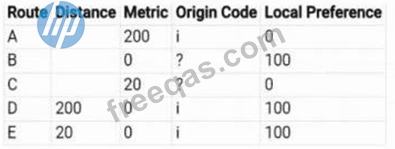
A BGP routing table contains multiple routes to the same destination prefix. Referring to the table below, which route would be marked with a ">" symbol?
Correct Answer: E
The Aruba AOS-CX BGP Best Path Selection Process determines which route becomes the active (>) route in the BGP routing table. This process is consistent with RFC 4271 but detailed in HPE's Aruba AOS-CX Routing Guide and ACSP Study Guide - BGP and Dynamic Routing. Extract 1 - BGP Path Selection Hierarchy (Aruba AOS-CX Routing Guide) "When multiple BGP routes exist to the same destination, the router uses the following decision sequence to select the best path: * Highest LOCAL_PREFERENCE * Lowest AS_PATH length * Lowest ORIGIN type (IGP 'i' preferred over EGP 'e', preferred over Incomplete '?') * Lowest MULTI_EXIT_DISC (MED) if received from the same AS * Lowest IGP cost to the next hop (closest exit) * Lowest BGP router ID as tie-breaker." Extract 2 - Aruba Certified Switching Professional (ACSP) Study Guide - BGP Path Decision "Local Preference is the first and most significant criterion within a single AS. A higher Local Preference value indicates a preferred exit. If multiple routes have equal Local Preference, the router compares their Origin Codes. An Origin Code of 'i' (IGP) is preferred over '?' (Incomplete). If still tied, the route with the lowest IGP cost to the next-hop is chosen as best." Step-by-Step Application to the Table Step 1 - Local Preference * Routes B, D, and E have Local Preference = 100 * Routes A and C have Local Preference = 0 # Routes A and C are eliminated. Remaining candidates: B, D, E Step 2 - Origin Code * D and E: Origin Code = i (IGP) # Preferred * B: Origin Code = ? (Incomplete) # Less preferred # Eliminate B Remaining candidates: D, E Step 3 - MED / Metric Both D and E have Metric = 0 # Still tied Step 4 - IGP Cost / Administrative Distance * D: Distance = 200 * E: Distance = 20 According to ArubaOS-CX: "When all BGP attributes are equal, the route with the lowest internal cost (shortest IGP distance) to the next-hop is selected." # E wins because it has a lower distance (20 < 200) Extract 3 - ArubaOS-CX Routing Reference "The route that wins the selection process is marked with a '>' symbol in the routing table. This route is installed in the forwarding table and used for traffic forwarding." Final Explanation * Route E has: * Highest Local Preference (100) * Best Origin (IGP 'i') * Lowest IGP distance (20) Hence, Route E is selected as the best path, and the ">" symbol is placed beside it in the BGP routing table. # Final Verified answer: E # Official Aruba Documentation References: * Aruba AOS-CX Routing Guide - Section: BGP Best Path Selection Criteria * Aruba Certified Switching Professional (ACSP) Study Guide - Module: BGP and Path Selection Logic * Aruba AOS-CX Configuration and Management Guide - Command: show ip bgp summary / route selection
Question 43
Which command would allow you to verify receipt of a CoA (Change of Authorization) message on an AOS-10 Gateway?
Correct Answer: B
Comprehensive and Detailed Explanation (Verified Extract from HPE Aruba Networking AOS-10 Gateway Documentation) The Change of Authorization (CoA) message is a RADIUS-based control packet typically sent by ClearPass Policy Manager or another RADIUS server to modify client authorization dynamically after authentication. In ArubaOS 10, CoA and Disconnect-Request (DM) messages use UDP port 3799 and are received on the control path of the gateway, not the datapath. HPE Aruba AOS-10 documentation specifies: "Use the command packet-capture controlpath udp 3799 on the gateway to verify that CoA packets are being received and processed on the control plane." "The controlpath capture displays inbound CoA or DM messages received from RADIUS servers such as ClearPass." Command breakdown: packet-capture controlpath udp 3799 * controlpath # Captures control-plane traffic (used for management protocols like RADIUS, CoA, CAPWAP, etc.) * udp 3799 # Filters only CoA/DM packets Why Others Are Incorrect: * A. interprocess captures internal gateway processes, not RADIUS packets. * C. diag utilities tcpdump is used in AOS 8.x, not AOS 10. * D. tcpdump host-port 3576 uses the wrong port; CoA uses UDP 3799, not 3576 (which is for standard RADIUS authentication). # Final Verified answer: B. packet-capture controlpath udp 3799 # Reference Sources (HPE Aruba Official Materials): * Aruba AOS-10 Gateway Troubleshooting Guide - Control Path Packet Capture Commands * Aruba ClearPass and AOS Integration Guide - RADIUS CoA Port (UDP 3799) * Aruba Certified Mobility Professional (ACMP) Study Guide - CoA and Disconnect Message Verification
Question 44
The ACME company has an AOS-CX 6200 switch stack with an uplink oversubscription ratio of 9.6:1. They are considering adding two more nodes to the stack without adding any additional uplinks due to cabling constraints One oftheir architects has expressed concerns that their critical UDP traffic from both wired and bridged AP clients will encounter packet drops.They have already applied the following configuration: Which strategy will complement this solution to achieve their objective?
Correct Answer: D
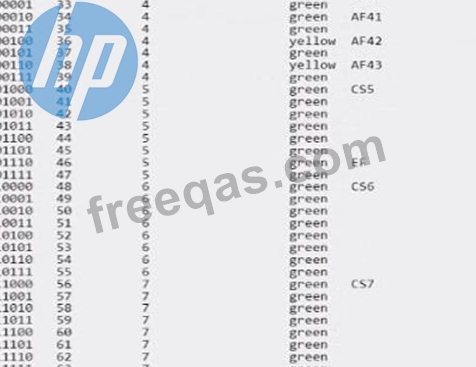
Given that the ACME company's concern is about UDP traffic potentially encountering packet drops due to uplink oversubscription, they need a strategy that prioritizes critical UDP traffic to minimize loss. Option D,edge mark critical UDP traffic with AF42, is the correct answer. Assured Forwarding (AF) classes provide a way to assign different levels of delivery assurance for IP packets. AF42 is typically used for traffic that requires low latency and low loss, such as voice and video, which often use UDP. Marking critical UDP traffic with AF42 will help ensure that this traffic is treated with higher priority over the network. Option A (edge mark lower priority TCP traffic with AF12) and Option C (edge mark lower priority TCP traffic with AF11) suggest marking lower priority TCP traffic, which does not directly address the concern for critical UDP traffic. Option B (edge mark critical UDP Traffic with CS5) suggests using Class Selector 5 for critical UDP traffic, which is also a valid approach but does not match the existing configuration that is focused on Assured Forwarding (AF) classes.
Question 45
You configured a tunneled SSID with captive portal and a ClearPass Guest Self Registration workflow when testing and launching the self-registration workflow, after successful registration, the login action shows the following error: What is the best solution to resolve this error?
Correct Answer: D
Including the root and intermediate certificates in the captive portal certificate for the gateway will resolve the error seen during the login action after successful registration. This is necessary to ensure the SSL/TLS handshake can be completed successfully, as the client browser needs to validate the entire certificate chain.