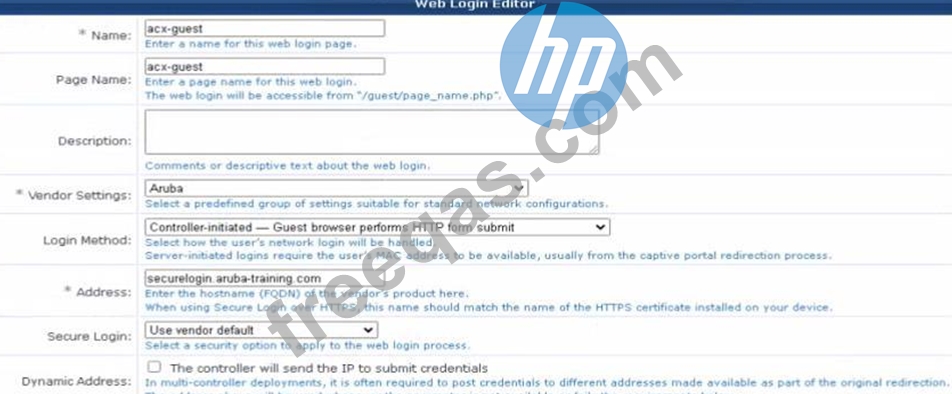
The correct address for the ClearPass Guest should match the FQDN of the HTTPS certificate installed on the device, which is often the FQDN of the vendor's product. This ensures secureand proper redirection to the captive portal during the authentication process. The FQDN should be entered in the Address field for ClearPass Guest configuration.
Question 37
An OSPF router has learned a path to an external network by both an E1 and an E2 advertisement. Both routes have the same path cost. Which path will the router prefer?
Correct Answer: C
In HPE Aruba Networking (AOS-CX and AOS-Switch) OSPF implementation, the routing behavior for external routes (Type 5 LSAs) distinguishes between two types of external advertisements: * E1 (Type-1 external) - The total path cost is calculated as the sum of the internal cost to reach the ASBR (Autonomous System Boundary Router) plus the external cost as advertised in the LSA. * E2 (Type-2 external) - The external cost is considered independent of the internal OSPF path cost to reach the ASBR. Thus, the metric used is only the external cost from the LSA. When both an E1 and an E2 route exist to the same external destination, OSPF gives preference to the E1 route, regardless of metric values, because the E1 route represents a more accurate total cost to the destination (including internal OSPF cost). Extract (as per HPE Aruba OSPF Technical Overview and AOS-CX Routing Guide): "When both Type-1 (E1) and Type-2 (E2) external LSAs for the same destination are present, the router always prefers the Type-1 route. Type-1 routes include both internal and external costs in the total metric, while Type-2 routes use only the external cost. The E1 path is therefore considered more precise and is selected as the preferred route." This is consistent across Aruba's OSPF implementation and follows standard OSPF behavior as defined by the protocol (RFC 2328). Therefore, when both E1 and E2 routes are available and have the same overall cost, the router will always prefer the E1 path. References:* HPE Aruba Networking AOS-CX Routing Configuration Guide - OSPF External Route Preference (Section: OSPF External LSAs).* HPE Aruba Certified Switching Professional (ACSP) Study Guide - OSPF Route Selection and External Type Behavior.* HPE ArubaOS-Switch Management and Configuration Guide - OSPF External Route Types (E1 vs E2).
Question 38
Which statements accurately describe OSPF Graceful Restart (when the restarting router is able to Keep its forwarding tables across the restart)? (Select two.)
Correct Answer: A,D
Graceful Restart (GR) allows a router to continue forwarding packets while it restarts its OSPF process. The GR helper role on AOS-CX switches supports routers during this process. OSPFrouters listen for Grace-LSAs to identify neighbors undergoing a graceful restart, maintaining adjacencies with those routers to allow uninterrupted forwarding.
Question 39
A customer would like to allow their IT Helpdesk to configure IoT devices to connect to a single SSID using a unique PSK that other devices cannot use. Which solution would you recommend?
Correct Answer: B
Comprehensive and Detailed Explanation From Exact Extract of HPE Aruba Networking Switching: The requirement in this question is to allow IT staff to provision unique pre-shared keys (PSKs) for each IoT device on a single SSID, ensuring that one device's PSK cannot be used by another. This is the definition of Multi-Pre-Shared Key (MPSK) functionality. HPE Aruba Networking supports three main MPSK deployment methods: * MPSK Local - Keys are defined locally on the AP or gateway; no external integration. * MPSK with ClearPass - Keys are managed and validated via ClearPass Policy Manager. * MPSK with Cloud Authentication - Keys are generated, stored, and managed natively through Aruba Central Cloud Authentication. In this scenario, the IT Helpdesk wants a simplified, cloud-based method to generate and manage per-device unique PSKs without needing a ClearPass deployment. This aligns directly with MPSK AES with HPE Aruba Networking Central Cloud Authentication. Exact Extract from HPE Aruba Networking Switching and Central Documentation: "MPSK with Cloud Authentication allows administrators to configure a single SSID where each device is assigned a unique PSK. The PSKs are securely stored and validated using Aruba Central's cloud-based authentication service." "Each PSK is tied to a specific client identity. If another device attempts to connect using the same PSK, the authentication will fail." "This method simplifies onboarding of IoT and headless devices while maintaining security equivalent to 802.1X." Thus, the correct recommendation is MPSK AES with Aruba Central Cloud Authentication, which fully supports per-device key uniqueness, centralized management, and cloud-based authentication-ideal for IoT device onboarding. Why the Other Options Are Incorrect: * A. MPSK AES with ClearPass:Valid and secure, but requires an on-prem ClearPass Policy Manager deployment. The question specifies a simpler method for IT Helpdesk to manage keys directly, which Cloud Authentication provides natively. "ClearPass MPSK requires policy manager integration; Aruba Central Cloud Authentication provides a simpler cloud-native alternative." * C. MPSK Local:Suitable for small static environments, but not scalable and requires manual key creation on the AP or gateway. Does not allow IT staff to easily generate new keys per device via Central. "MPSK Local does not support centralized lifecycle management or key revocation." * D. MPSK AES with MAC Auth:MPSK already handles per-device authentication via unique keys; MAC authentication is unnecessary and less secure. "MAC authentication is an alternate method for non-802.1X devices but is not required with MPSK." References of HPE Aruba Networking Switching Documents or Study Guide: * Aruba Central Cloud Authentication and MPSK Deployment Guide - "Configuring MPSK AES with Cloud Authentication." * Aruba Wi-Fi 6 and IoT Integration Best Practices Guide - "Securing IoT with Cloud-Managed MPSK." * ArubaOS 10 WLAN Configuration Guide - "MPSK Modes (Local, ClearPass, Cloud Authentication) and Use Cases."
Question 40
A customer's infrastructure is set up to use both primary and secondary gateway clusters on the SSID profile cased on best practices. Why do they have an equal split of their 120 APs across the primary and secondary gateway clusters?
Correct Answer: D
When cluster preemption is not enabled, access points (APs) will not automatically fail back to the primary gateway cluster once it is up again after having failed over to the secondary. This would result in an equal split of APs across primary and secondary clusters if both clusters are operational. Without preemption, there's no automatic rebalancing of APs back to the primary cluster, leading to the current distribution.