FreeQAs
 Request Exam  Contact
  • Home
  • View All Exams
  • New QA's
  • Upload
PRACTICE EXAMS:
  • Oracle
  • Fortinet
  • Juniper
  • Microsoft
  • Cisco
  • Citrix
  • CompTIA
  • VMware
  • ISC
  • SAP
  • EMC
  • PMI
  • HP
  • Salesforce
  • Other
  • Oracle
    Oracle
  • Fortinet
    Fortinet
  • Juniper
    Juniper
  • Microsoft
    Microsoft
  • Cisco
    Cisco
  • Citrix
    Citrix
  • CompTIA
    CompTIA
  • VMware
    VMware
  • ISC
    ISC
  • SAP
    SAP
  • EMC
    EMC
  • PMI
    PMI
  • HP
    HP
  • Salesforce
    Salesforce
  1. Home
  2. Linux Foundation Certification
  3. CKA Exam
  4. LinuxFoundation.CKA.v2026-10-12.q90 Dumps
  • «
  • 1
  • 2
  • 3
  • 4
  • 5
  • 6
  • 7
  • 8
  • 9
  • 10
  • …
  • »
  • »»
Download Now

Question 1

Create a pod that having 3 containers in it? (Multi-Container)

Correct Answer:
image=nginx, image=redis, image=consul
Name nginx container as "nginx-container"
Name redis container as "redis-container"
Name consul container as "consul-container"
Create a pod manifest file for a container and append container
section for rest of the images
kubectl run multi-container --generator=run-pod/v1 --image=nginx --
dry-run -o yaml > multi-container.yaml
# then
vim multi-container.yaml
apiVersion: v1
kind: Pod
metadata:
labels:
run: multi-container
name: multi-container
spec:
containers:
- image: nginx
name: nginx-container
- image: redis
name: redis-container
- image: consul
name: consul-container
restartPolicy: Always
insert code

Question 2

Create a busybox pod that runs the command "env" and save the output to "envpod" file

Correct Answer:
See the solution below.
Explanation
kubectl run busybox --image=busybox --restart=Never --rm -it -- env > envpod.yaml
insert code

Question 3

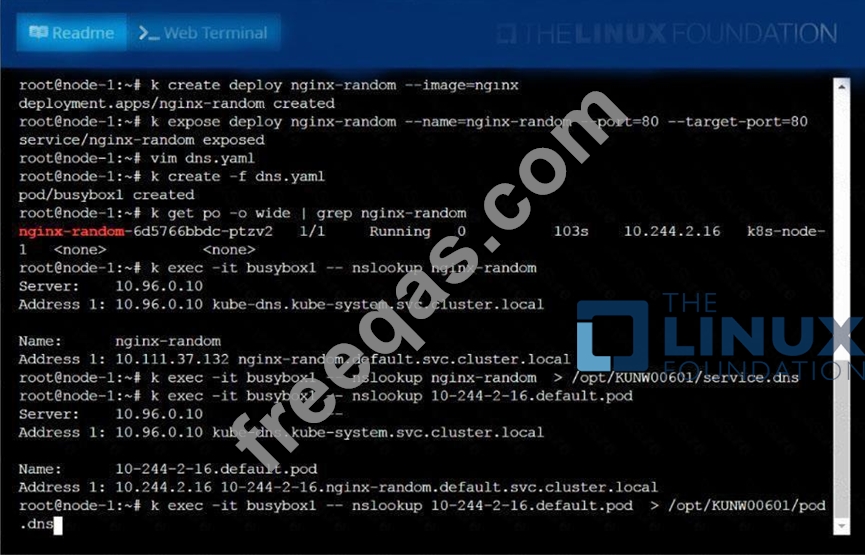
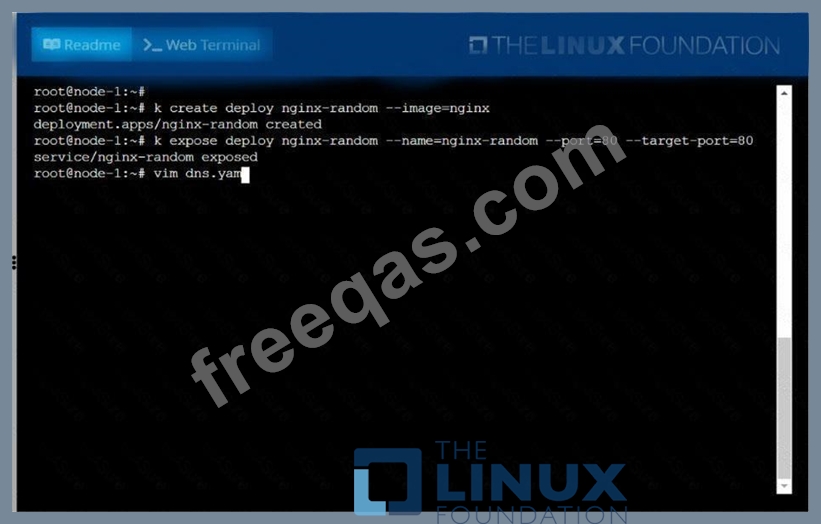
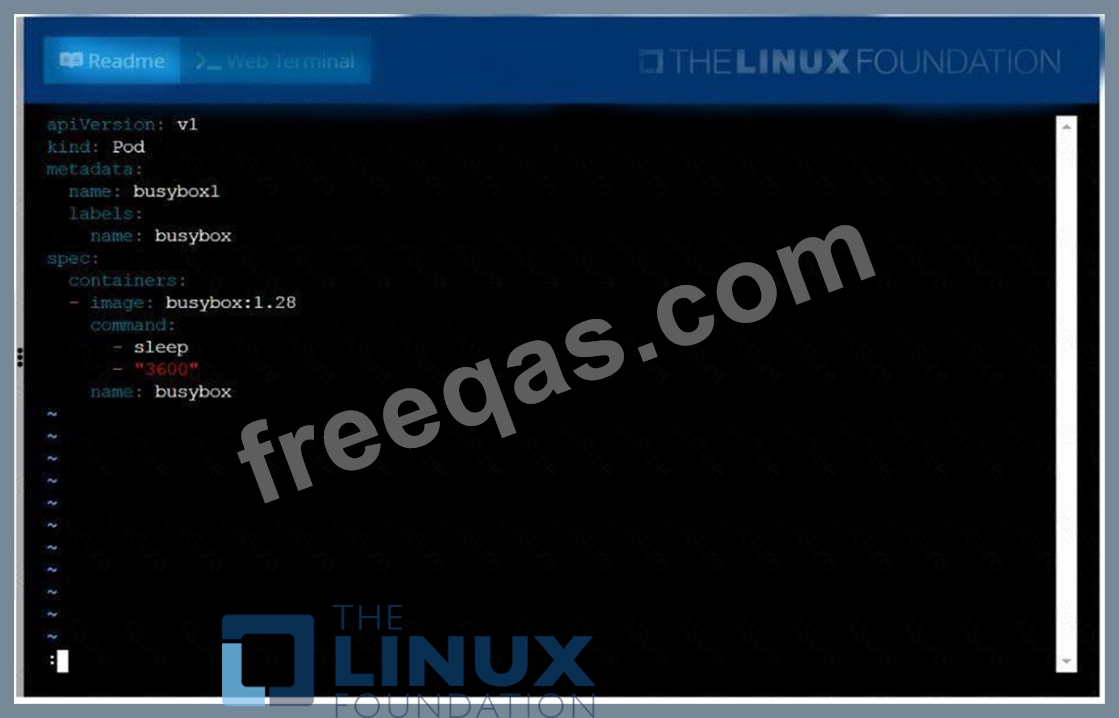
Create a deployment as follows:
* Name:nginx-random
* Exposed via a servicenginx-random
* Ensure that the service & podare accessible via theirrespective DNS records
* The container(s) within anypod(s) running as a part of thisdeployment should use thenginxImage Next, use the utilitynslookupto lookup the DNS records of the service &pod and write the output to
/opt/KUNW00601/service.dnsand/opt/KUNW00601/pod.dnsrespectively.
Correct Answer:
See the solution below.
Explanation
Solution:


insert code

Question 4

You are tasked with setting up a Kubernetes cluster for a company with a strict security policy. They have two different teams: Development and Operations, with distinct access requirements.
The Development team needs read-only access to all resources and the ability to create and manage deployments, pods, and services. The Operations team needs full access to all resources, including cluster management, and the ability to perform actions like scaling, rolling updates, and troubleshooting.
Design a role-based access control (RBAC) configuration using Kubernetes resources (Role, RoleBinding, ClusterRole, ClusterRoleBinding) to grant appropriate access to each team.
Correct Answer:
See the solution below with Step by Step Explanation.
Explanation:
Solution (Step by Step) :
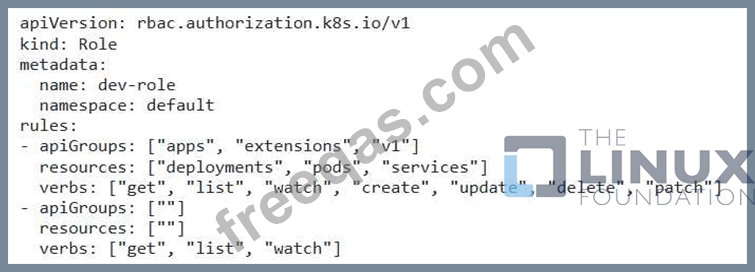
Step 1: Create a Role for the Development team:

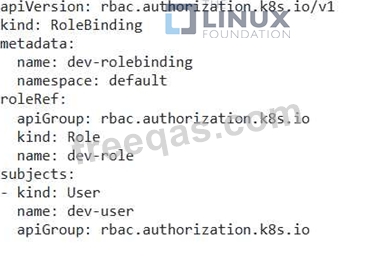
Step 2: Create a RoleBinding for the Development team:

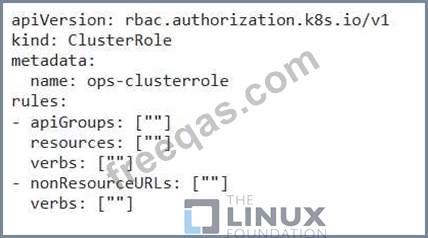
Step 3: Create a ClusterRole for the Operations team:

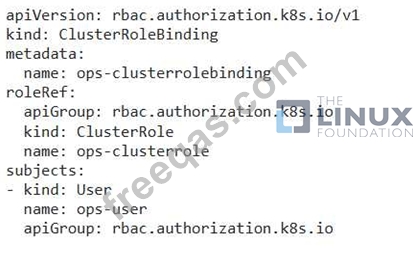
Step 4: Create a ClusterRoleBinding for the Operations team:

The Role for the Development team grants specific permissions to create, manage, and view deployments, pods, and services. It also grants read-only access to all other resources. The RoleBinding links the "dev-role" to the "dev-user" account, allowing them to perform actions as defined by the Role. The ClusterRole for the Operations team provides full access to all cluster resources and allows them to perform any action, including cluster management tasks. The ClusterRoleBinding links the "ops-clusterrole" to the "ops-user" account, granting them complete control over the cluster. Note: You can replace "dev-user" and "ops-user" with actual user names or service accounts.
insert code

Question 5

Score: 5%

Task
Monitor the logs of pod bar and:
* Extract log lines corresponding to error file-not-found
* Write them to /opt/KUTR00101/bar

Correct Answer:
Solution:
kubectl logs bar | grep 'unable-to-access-website' > /opt/KUTR00101/bar cat /opt/KUTR00101/bar
insert code
  • «
  • 1
  • 2
  • 3
  • 4
  • 5
  • 6
  • 7
  • 8
  • 9
  • 10
  • …
  • »
  • »»
[×]

Download PDF File

Enter your email address to download LinuxFoundation.CKA.v2026-10-12.q90 Dumps

Email:

FreeQAs

Our website provides the Largest and the most Latest vendors Certification Exam materials around the world.

Using dumps we provide to Pass the Exam, we has the Valid Dumps with passing guranteed just which you need.

  • DMCA
  • About
  • Contact Us
  • Privacy Policy
  • Terms & Conditions
©2026 FreeQAs

www.freeqas.com materials do not contain actual questions and answers from Cisco's certification exams.